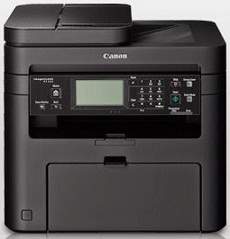
Printing with the Canon ImageCLASS MF215 printer is an exceptional experience, delivering ideal print quality and speed. With a printing rate of 23 pages per minute (ppm) for black and white printing on A4 paper, it is highly efficient for busy office environments. The printer boasts a print quality of 1200 x 1200 dots per inch (dpi) at the optimum level, ensuring that every print is crisp, clear and professional-looking. Even at the minimum resolution of 600 x 600 dpi, the printer still produces high-quality prints. The supported print language is UFR II LT emulation, which is highly compatible with a wide range of software applications. The first printout time is a mere 6 seconds, ensuring that you can get your work done quickly and efficiently. Overall, the Canon ImageCLASS MF215 printer is an excellent choice for businesses seeking high-performance printers that can deliver exceptional results.
Canon imageCLASS MF215 Printer Driver Downloads
Driver for Windows
Filename
Size
Download
MFDrivers for Windows XP Vista 7 8 8.1 and 10 32 bit.exe (Recommended)
Download Canon imageCLASS MF215 driver from Canon website
Specifications
The Canon ImageCLASS MF215 printer is a high-capacity model that can churn out up to 8,000 pages per month. However, the manufacturer recommends a more modest range of 500 to 2000 pages per month, ensuring optimal performance and longevity of the printer.
When it comes to scanning, this printer utilizes a flatbed scanner with a depth of 24 bit. The optimal scan resolution in standard mode is 600 x 600 dpi for the optical resolution. However, for even higher quality scans, the driver enhanced resolution can go up to an impressive 9600 x 9600 dpi.
The scanner boasts compatibility with TWAIN and WIA, as well as scan driver compatibility for scanning to both PC and USB. Additionally, the printer has an impressive copy speed of up to 23 pages per minute with a resolution of 600×600 dpi. With the ability to resize document output to a minimum of 50% and maximum of 400% in 1% increments, this scanner is a versatile tool for any professional. Its copy mode also includes features such as ID card copy, four on 1, 2 on one, and memory sort, making it an all-in-one solution for your document needs.
Regarding paper handling, the input paper tray has a capacity of up to 250 sheets of plain paper of standard weight. Additionally, a versatile tray with a one-sheet-per-time capacity is available for various purposes. The output tray is capable of accommodating 100 pages of printed documents in the face-down orientation.
The input tray boasts an impressive capacity for standard weight paper, allowing for uninterrupted printing without the need for frequent paper refills. Meanwhile, the versatile tray offers flexibility for specialized paper types or printing needs, ensuring efficient and seamless operation.
As for the output tray, it conveniently holds up to 100 pages of printed documents in a face-down pattern, maximizing space and minimizing the need for frequent emptying. This feature is particularly useful for environments with high printing volumes.
Overall, this printer’s paper handling capabilities are top-notch, providing both efficiency and convenience for a variety of printing needs.
Ad
Canon imageCLASS MF215 Driver
Ad
Experience exceptional print quality and speed with the Canon ImageCLASS MF215 model printer. This printer boasts an impressive printing rate of 23 pages per minute (ppm) for black and white printing on A4 paper, ensuring quick and efficient printing. Additionally, the printer delivers optimum print quality with a resolution of 1200 x 1200 dots per inch (dpi), while the minimum resolution is approximately 600 x 600 dpi.
The Canon ImageCLASS MF215 model printer supports the UFR II LT emulation print language, enabling seamless communication between the printer and your device. Moreover, this printer has a first printout time of about 6 seconds, allowing you to print your documents in a jiffy.
Invest in the Canon ImageCLASS MF215 model printer for an exceptional printing experience with the perfect combination of speed and quality.
Canon imageCLASS MF215 Printer Driver Downloads
Driver for Windows
Filename
Size
Download
MFDrivers for Windows XP Vista 7 8 8.1 and 10 32 bit.exe (Recommended)
Download Canon imageCLASS MF215 driver from Canon website
Specifications
The Canon ImageCLASS MF215 printer is a high-capacity model that can produce up to 8,000 pages in a single month. However, it is recommended by the manufacturer to use it in the range of 500 to 2000 pages per month.
When it comes to scanning specifications, this printer model uses a flatbed scanner with a depth of 24 bit. The optical resolution for the standard scanning mode is 600 x 600 dpi. However, if you use the driver enhanced resolution, you can get up to 9600 x 9600 dpi.
Overall, the Canon ImageCLASS MF215 printer is a reliable and efficient option for those who need to print and scan documents on a regular basis. Its high-capacity and advanced scanning features make it a great choice for businesses and individuals alike.
The scanning device boasts compatibility with both TWAIN and WIA, alongside scan driver compatibility for seamless scanning to both your PC and via USB. Meanwhile, the printer’s copy speed can reach an impressive 23 pages per minute, all while maintaining a high resolution of 600×600 dpi. The output of scanned documents is easily adjustable, with the ability to resize from a minimum of 50% to a maximum enlargement of 400%, in increments of 1%. Additional features of the copy mode include ID card copy, four on 1, 2 on one, and memory sort.
Regarding paper management, the input paper tray has the capacity to hold up to 250 sheets of plain paper with standard weight. Additionally, there is a versatile tray that can hold one sheet of paper at a time, serving multiple purposes. Meanwhile, the output tray can conveniently accommodate up to 100 pages of printed documents in a face-down orientation.