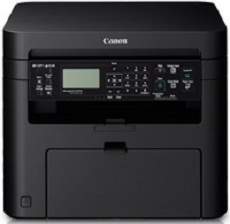
The Canon ImageCLASS MF221d printer boasts a versatile range of functions, including printing, copying, and scanning, and produces exceptional output. It is designed as a personal desktop printer and features an internal power supply that operates on 220-240 volts at 50/60 Hz. It is important to note that power requirements may vary depending on the country of use.
Another important consideration is the printer’s power consumption, which is influenced by its print status. This means that the power consumed by the printer will differ depending on whether it is actively printing or in standby mode. Despite these variations, the Canon ImageCLASS MF221d offers reliable performance and high-quality results.
Toner Catridge Details
Catridge 337 Toner : Upto yield 2,400 Pages
Canon imageCLASS MF221d Printer Driver Downloads
Driver for Windows
Filename
Size
Download
MFDrivers for Windows XP Vista 7 8 8.1 and 10 32 bit.exe (Recommended)
Download Canon imageCLASS MF221d driver from Canon website
Specifications
The printer’s power usage is impressively low, with a maximum of only 1300 watts or less. Even during standby mode, the average consumption is a mere 4.1 watts. And when in sleep mode, power consumption drops to a measly 1.7 watts.
To get started, the machine requires just 13.5 seconds to warm up before printing. And when it comes to physical measurements, the printer stands at a height of 312 mm, with a width of 390 mm and a length of 371 mm.
The Canon imageCLASS MF221d printer is a robust machine that weighs 11.4 kg and requires specific environmental conditions for optimal performance. To ensure the printer functions correctly, the temperature should be maintained between 10 and 300C. Additionally, the relative humidity should fall between 20 and 80%, and there should be no condensation.
On the other hand, this printer comes with a variety of interface options, including 100Base-TX, 10Base-T, Hi-speed USB 2.0 port, and IEEE 802.11b/g/n component. These options make it easy to connect the printer to a variety of devices and networks.
Moreover, the Canon imageCLASS MF221d printer features a high-quality color scanner with a maximum compatible size of 216 mm x 297 mm. This feature makes it easy to scan documents and images with exceptional clarity and precision.
The optical resolution of the printer’s scanning process is up to 600 x 600 dots per inch (dpi). In the same way, the software interpolation resolution is 9600 x 9600 dpi. Also, the driver options include the TWAIN, WIA 1.0 (Windows XP), WIA 2.0 (Windows Vista/7/8/8.1) and ICA (Mac OS X). Furthermore, the output tray of the device can hold approximately 100 sheets of printed paper at 68 gsm.
Ad
Canon imageCLASS MF221d Driver
Ad
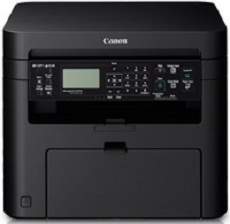
The Canon ImageCLASS MF221d printer boasts a versatile range of functions, including printing, copying, and scanning, all while delivering exceptional results. With its compact size, it’s the perfect fit for any personal desktop setup. It’s important to note that the printer’s internal power supply operates on 220-240 volts at 50/60 Hz, but power requirements may vary depending on the country of use.
While power supply is a crucial consideration, power consumption is equally important. The printer’s power consumption is directly tied to its print status, so it’s essential to be mindful of this when using it. With its multifunction capabilities and energy-efficient design, the Canon ImageCLASS MF221d printer is a reliable and value-packed addition to any workspace.
Toner Catridge Details
Catridge 337 Toner : Upto yield 2,400 Pages
Canon imageCLASS MF221d Printer Driver Downloads
Driver for Windows
Filename
Size
Download
MFDrivers for Windows XP Vista 7 8 8.1 and 10 32 bit.exe (Recommended)
Download Canon imageCLASS MF221d driver from Canon website
Specifications
The printer boasts an impressive maximum power usage of 1300 watts or even less. Even during standby mode, it only consumes an average of 4.1 watts. When in sleep mode, the power consumption drops to approximately 1.7 watts. It takes just 13.5 seconds for the machine to warm up and be ready to print.
In terms of physical measurements, the printer stands at a height of 312 mm, with a width of 390 mm and a length of 371 mm. These specifications make it a compact and efficient choice for any workspace.
The weight of the Canon imageCLASS MF221d machine measures in at approximately 11.4 kg, and it requires specific environmental conditions to function optimally. One critical factor is maintaining a temperature range between 10 and 300C. Additionally, the relative humidity must be within a range of 20 to 80%, without any condensation.
On the other hand, this device boasts an impressive array of interface options, including 100Base-TX, 10Base-T, a Hi-speed USB 2.0 port, and IEEE 802.11b/g/n components. The device also features a color scanner capable of handling a maximum compatible size of 216 mm x 297 mm. Utilizing this device enables efficient and reliable document processing for home or office settings alike.
The optical resolution of the printer’s scanning process is up to 600 x 600 dots per inch (dpi). In the same way, the software interpolation resolution is 9600 x 9600 dpi. Also, the driver options include the TWAIN, WIA 1.0 (Windows XP), WIA 2.0 (Windows Vista/7/8/8.1) and ICA (Mac OS X). Furthermore, the output tray of the device can hold approximately 100 sheets of printed paper at 68 gsm.