Canon PIXMA G3202 Driver
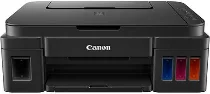
To ensure peak performance when printing with the Canon PIXMA G3202, it’s essential to use its corresponding driver. Optimal results can be achieved with this printer, with a print speed of approximately 60 seconds for borderless 4×6 photo paper. When printing black documents, the ESAT rate is 8.8 images per minute (ipm), while color printing has an ESAT rate of 5.0 ipm. This printer boasts a total of 1472 nozzles, including 1152 nozzles for color and 32 nozzles for pigment black printing.
Canon PIXMA G3202 Printer Driver Downloads
Driver for Windows
| Filename | Size | Download | |
| MP Drivers for windows.exe (Recommended) | 36.92 MB | ||
| Full Driver and Software Package for windows.exe (Recommended) | 48.17 MB | ||
| XPS Printer Driver for windows.exe (Recommended) | 18.61 MB | ||
| Printers and Multifunction Printers security patch for Windows.exe (Recommended) | 42.41 KB | ||
| Download Canon PIXMA G3202 driver from Canon website | |||
Driver for Mac OS
| Filename | Size | Download | |
| CUPS Printer Driver for Mac.dmg | 14.52 MB | ||
| ICA Driver for Mac.dmg | 3.48 MB | ||
| Full Driver and Software Package for Mac.dmg | 10.51 MB | ||
| Download Canon PIXMA G3202 driver from Canon website | |||
Driver for Linux
Linux (32-bit), Linux (64-bit)
| Filename | Size | Download | |
| IJ Printer Driver for Linux – debian Packagearchive | 659.39 KB | ||
| IJ Printer Driver for Linux – rpm Packagearchive | 287.77 KB | ||
| IJ Printer Driver for Linux – Source file | 476.65 KB | ||
| ScanGear MP for Linux – debian Packagearchive | 235.86 KB | ||
| ScanGear MP for Linux – rpm Packagearchive | 212.62 KB | ||
| ScanGear MP for Linux – Source file | 204.40 KB | ||
| Download Canon PIXMA G3202 driver from Canon website | |||
Specifications
The print resolution of this device can reach up to an impressive 4800 x 1200 dots per inch (dpi) under optimal conditions. Ink compatibility varies depending on the type of ink used, with options ranging from GI-290 BK pigment black ink to GI-290 C/M/Y dye-based inks. The black ink cartridge has a maximum volume of 12=35 ml, while the color ink cartridge can hold up to 70.0 ml. This device is also compatible with various paper sizes, including 4 x 6 inches, 5 x 5 square inches, 5 x 7, 8 x 10, legal, letter, and US #10 envelopes.
Related Printer: Canon Pixma G3010 Driver
The Canon PIXMA G3202 is compatible with a variety of paper types, including plain paper, high-resolution canon paper, photo paper plus glossy II, and photo paper glossy papers. It also supports photo paper, semi-gloss, pro luster, matte photo paper, and US # envelopes.
This printer offers several impressive features, such as auto photo fix, borderless printing, business card printing, Canon PRINT app, and document printing. In addition, it has easy photo print+, full HD movie print, Google Cloud Print, and high paper yield.
With its versatile paper compatibility and diverse range of features, the Canon PIXMA G3202 is a great choice for all your printing needs.
Some distinct characteristics of this product include My Image Garden, photo printing, PIXMA Cloud Link, red-eye correction, and quiet mode functionality. The speed of copying is impressive, with a first copy out time of just 24 seconds for standard documents. Additionally, the scanning type boasts both a flatbed feature and a contact image sensor (CIS) element. The maximum optical printing resolution is 600 x 1200 dpi, with an interpolated resolution of up to 19200 x 19200 dpi.