
First-time setup
Epson / Drivers & setup
Epson WorkForce Pro WF-M5799DWF Driver
The Epson WorkForce Pro WF-M5799DWF is a monochrome business inkjet multifunction model. Saved files include combined setup, individual print/scan components, network administration and firmware tools.
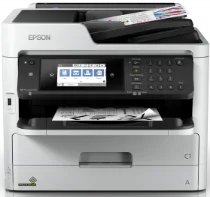
Model and software map
Business roleMonochrome print, scan, copy and fax
Setup optionCombined installer or separate enterprise components
Maintenance boundaryFirmware and network tools are not ordinary print drivers
Preserved inventory24 entries: 17 Windows, 7 macOS; 4 setup/full-package, 18 print, 2 scan.
01 Download the WorkForce Pro WF-M5799DWF driver
Two ways to download
Official Epson download ↗
Download a package directly from the list below, or get the newest version from Epson's official support site. The official link opens the WorkForce Pro WF-M5799DWF page; select your operating system there.
For one supported computer, start with Epson’s current combined installer. Administrators may instead deploy separate drivers and network tools under an existing policy.
Download a package
Pick the full package for a first-time setup, or only the printer or scanner driver if the printer is already connected. Each Download button creates a one-time link to the file.
First-time setup
Drivers and Utilities Combo Package for Windows XP.exe
Printing
Standard Printer Driver for Windows 10 8.1 8 7 vista xp 32 bit.exe
Printing
Standard Printer Driver for Windows 10 8.1 8 7 vista xp 64 bit.exe
Printing
Standard Printer Driver – Core files for Windows 10 8.1 8 7 vista xp 32 bit.zip
Printing
Standard Printer Driver – Core files for Windows 10 8.1 8 7 vista xp 64 bit.zip
Scanning
Scanner Driver and Epson Scan 2 Utility for Windows.exe
Printing
Universal Print Driver – Core files for Windows 10 8.1 8 7 vista xp 32 bit.zip
Printing
Universal Print Driver – Core files for Windows 11 10 8.1 8 7 vista xp 64 bit.zip
Printing
Universal Print Driver for Windows 10 8.1 8 7 vista xp 32 bit.zip
Printing
Universal Print Driver for Windows 10 8.1 8 7 vista xp 64 bit.zip
Printing
PostScript 3 Printer Driver – Core files for Windows 10 8.1 8 7 vista xp 32 bit.zip
Printing
PostScript 3 Printer Driver – Core files for Windows 11 10 8.1 8 7 vista xp 64 bit.zip
Printing
PostScript 3 Printer Driver for Windows 10 8.1 8 7 vista xp 32 bit.exe
Printing
PostScript 3 Printer Driver for Windows 11 10 8.1 8 7 vista xp 64 bit.exe
Printing
Remote Print Driver for Windows 10 8.1 8 7 vista xp 32 bit.exe
Printing
Remote Print Driver for Windows 11 10 8.1 8 7 vista xp 64 bit.exe
Printing
Standard Printer Driver for mac OS X 10.6 to 12.dmg
First-time setup
Drivers and Utilities Combo Package Installer for mac OS X 10.15 to 12.dmg
First-time setup
Drivers and Utilities Combo Package Installer for mac OS X 10.7 to 10.14.dmg
Scanning
Scanner Driver and Epson Scan 2 Utility for mac OS X 10.6 to 12.dmg
Printing
PostScript 3 Printer Driver for mac OS X 10.6 to 12.dmg
Printing
Remote Print Driver for mac OS X 10.6 to 12.dmg
Printing
Remote Print Driver for mac OS X 10.5.dmg
02 Install and verify
Step 1
Match the full WF-M5799DWF name on Epson support.
Step 2
Select the present OS and either complete or managed component scope.
Step 3
Validate printing, duplex scanning and the configured network destination.
Your success check
Run firmware only after checking Epson’s current instructions and device state.
03 Sources and review scope
Official model/support material and this page’s preserved file inventory were reviewed on 2026-09-20. No package was executed and no printer was hardware-tested. Historical filenames do not prove current OS compatibility.