
First-time setup
Epson / Drivers & setup
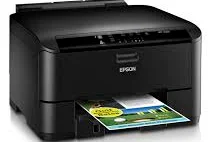
Epson WorkForce Pro WP-4020 Driver
The Epson WorkForce Pro WP-4020 is a single-function inkjet printer. Epson offers a combo package for network printing, a printer driver and separate remote-print or administration utilities.
Model and software map
Device roleColor printing only
Local/network routeCombo package includes printer driver and network installer
Remote distinctionRemote Print requires Epson Connect and is not local setup
Preserved inventory18 entries: 11 Windows, 7 macOS; 4 setup/full-package, 13 print, 1 utility/other.
01 Download the WorkForce Pro WP-4020 driver
Two ways to download
Official Epson download ↗
Download a package directly from the list below, or get the newest version from Epson's official support site. The official link opens the WorkForce Pro WP-4020 page; select your operating system there.
Use the combo package for normal local or network printing. Choose Remote Print only for Epson Connect use; it does not replace the local queue.
Download a package
Pick the full package for a first-time setup, or only the printer or scanner driver if the printer is already connected. Each Download button creates a one-time link to the file.
First-time setup
Drivers and Utilities Combo Package for Windows 7 Vista XP.exe
Printing
Printer Driver for Windows 8 8.1 10 32 bit.exe
Printing
Printer Driver for Windows 8 8.1 10 64 bit.exe
Printing
Epson WorkForce Pro WP 4020 Printer Driver for Windows XP Vista 7 and 10 32 bit
Printing
Epson WorkForce Pro WP 4020 Printer Driver for Windows XP Vista 7 and 10 64 bit
Printing
Epson WorkForce Pro WP 4020 Remote Print Driver for Windows XP Vista 7 8 8.1 10 32 bit
Printing
Epson WorkForce Pro WP 4020 Remote Print Driver for Windows XP Vista 7 8 8.1 10 64 bit and 11
Printing
Epson WorkForce Pro WP-4020 Printer Driver for Windows XP Vista 7 and 10 64-bit
Printing
Remote Print Driver for Windows XP Vista 7 8 8.1 10 32 bit.exe
Printing
Remote Print Driver for Windows XP Vista 7 8 8.1 10 64 bit and 11.exe
First-time setup
Drivers and Utilities Combo Package Installer for Mac OS X 10.14 to 12.dmg
First-time setup
Drivers and Utilities Combo Package for Mac OS X 10.5 to 10.13.dmg
Printing
Printer Driver for Mac OS X 10.15 to 12.dmg
Printing
Printer Driver for Mac OS X 10.5 to 10.14.dmg
Printing
Remote Print Driver for Mac OS X 10.6 to 12.dmg
Printing
Remote Print Driver for Mac OS X 10.5.dmg
Optional tool
Common Updater for Mac OS X 10.5 and 10.6.dmg
02 Install and verify
Step 1
Select WP-4020 and the actual OS on Epson support.
Step 2
Install the combo or printer package for USB/Ethernet/Wi-Fi; configure Remote Print separately if needed.
Step 3
Print a test page through the intended local or remote path.
Your success check
This model has no scanner hardware, so scan software belongs to another product.
03 Sources and review scope
Official model/support material and this page’s preserved file inventory were reviewed on 2026-09-20. No package was executed and no printer was hardware-tested. Historical filenames do not prove current OS compatibility.