How to install Driver
One of the primary worries of a printer user is the procedures for installing the essential drivers and other features of the printer. Of all the conditions and factors, the Operating system versions are the most important one. Common OS include Microsoft Windows, Macintosh, and Linux. This article will expound on the step by step procedure of installing the drivers for primary printer groups concerning your Operating system versions.
How to install printer driver on Microsoft Windows
In the realm of Windows operating systems, the latest versions include Windows Vista, Windows 7, Windows 8, Windows 8.1, and the ever-popular Windows 10. For those seeking to install downloaded printer drivers on any of these aforementioned versions, the following procedural steps must be taken into consideration:
- Start by Turning off the Printer
- Double-click on the downloaded driver installer file and the program will start running. Note that for the above-listed Windows versions, it pops up a command dialog box whenever you are trying to start or install or uninstall any software or program. Secondly, another request that may pop up is that of the Administrator permission that will require your confirmation before you proceed. Just click YES or ALLOW or CONTINUE to advance on the process. However, if you did not log in as an Administrator, the system will require you to log out your user and sign in again, now as an administrator before restarting the program from Step 2.
On giving the administrative rights, the installation process begins and shows the Progress. Take note of actions that will be displayed on the screen as required on the way and respond accordingly. - When the process finishes, click COMPLETE. The printer interface may be displayed afterward to confirm the device is now ready for use. It is strongly advisable to restart your computer each time you install any program or driver or software.
To utilize the printer within a computer network, the Client offers a connection option. Alternatively, the Connect cable window permits manual selection of a connection in the event of cancellation. When prompted to confirm the selection, proceed to use the printer.
How to install printer driver on Macintosh OS
- find your mac operating system version
- Select About This Mac from the Apple menu.
- Find out which macOS your Mac is using.
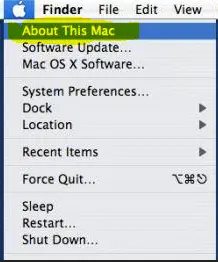
Check your Mac operating system version
Are you unsure about which version of the Mac operating system (OS) you’re currently using? It’s important to know your OS version because it affects the compatibility and performance of your computer.
To check your Mac OS version, click on the Apple icon in the top left corner of your screen and select “About This Mac.” This will bring up a window that displays your OS version, processor, and memory.
Knowing your OS version can help you determine if you need to update your software or hardware. It can also assist in troubleshooting issues and identifying compatibility problems with certain applications.
Make sure to check your Mac OS version regularly to ensure that your computer is running smoothly and efficiently. Don’t hesitate to seek professional assistance if you encounter any problems or have questions about your OS version.
When it comes to installing printer drivers on Mac OS, one must possess knowledge about the printer brand and model. To begin with, conduct an online search for the printer model name and its latest applicable drivers. After that, follow the procedures mentioned below in order to successfully install the drivers and begin using the printer.
- The first step is mounting the disk by double-clicking on the downloaded image file. This step unpacks the archive and fits it on the appropriate installer
- Identify the name of the particular data to install and double-click it to start the process properly
- The installation procedure begins. Pay attention to the messages and respond accordingly. If there is a prompting to accept or agree to the terms of the Software License Agreement, scan through and accept the terms.
- Choose the destination of the installation process and click on CONTINUE
- Click INSTALL. The administrator requires you to input the Username and Password of the admin and click on INSTALL
- Complete the process of installation and close the page
- Finally, the system notifies you on successful completion of the installation process
- Restart the system before the use of the printer.
How to install printer driver on Linux
To initiate the installation process for the printer driver on LINUX OS, it is imperative to ascertain the brand and model of the printer. Once the necessary information has been acquired, the next step is to procure the appropriate software tailored to the specifications of your device. Subsequently, proceed with the installation process by following the outlined steps:
- When you have downloaded the particularly needed software, connect the printer
- Make sure that the printer links correctly to your PC or the required network of computers
- Go to “Systems” and proceed to “Printers.” The system proceeds to the printer screen
- Click on “Add” button with a plus sign before it to add a new printing device
- A screen pops up where you can insert the device URL that you have identified or local a network printer or software on the downloaded folder
- Fill the information and proceed
- Complete the installation progression and restart your computer
Enjoy your printer