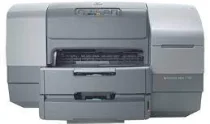
HP Business Inkjet 1100dtn Driver Download
- 3 drivers
- Supports Windows XP
- Windows · macOS · Linux
- ✓ Safe & free
The HP Business Inkjet 1100dtn Printer ink cartridges offer unparalleled performance and reliability for businesses of all sizes. With advanced inkjet technology and a high-capacity design, these cartridges are built to handle even the most demanding printing tasks with ease. Whether you're printing documents, graphics, or photos, these cartridges deliver crisp, clear, and vibrant results every time. They're also designed to work seamlessly with your printer, ensuring optimal performance and outstanding print quality. One of the key advantages of the HP Business Inkjet 1100dtn Printer ink cartridges is their high yield. With a capacity of up to 1,750 pages per cartridge, you can print more and replace your cartridges less frequently, saving you time and money in the long run. In addition to their high yield, these cartridges are also designed to be easy to install and maintain. They feature a user-friendly design that allows for quick and simple cartridge replacement, so you can get back to printing in no time. Overall, the HP Business Inkjet 1100dtn Printer ink cartridges are an excellent choice for businesses that demand the best in performance and reliability. So why wait? Upgrade your printer today and start enjoying the benefits of these high-quality cartridges.Introducing the HP 10 Black Original Ink Cartridge, boasting a print yield of approximately 2200 pages. Elevate your printing experience with the HP 11 Cyan Color Original Ink Cartridge, capable of producing around 2350 pages. The HP 11 Magenta Color Original Ink Cartridge offers a print yield of about 2000 pages, while the HP 11 Yellow Color Original Ink Cartridge can print up to 2550 pages. These cartridges utilize cutting-edge ink technology, ensuring crisp and vibrant prints with every use. Upgrade your printer's performance with these high-quality ink cartridges.HP Business Inkjet 1100dtn printer.
HP Business Inkjet 1100dtn Driver Downloads
| Driver | Operating System | Version | Size | Download |
|---|---|---|---|---|
| PCL3 Add Printer Recommended | Windows XP | — | 3 MB | Download |
| Drivers | macOS | — | 38.9 MB | Download |
| Basic | macOS | — | 24.2 MB | Download |
How to Install the HP Business Inkjet 1100dtn Driver
- Click the recommended driver package above and save the file to your PC.
- Open the downloaded file and follow the on-screen HP installer.
- Connect the Business Inkjet 1100dtn by USB or network when prompted.
- Finish and print a test page to confirm the driver works.