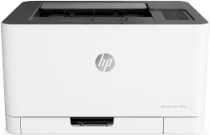
HP Color Laser 150nw Driver Download
- 5 drivers
- Supports Windows 11
- Windows · macOS · Linux
- ✓ Safe & free
The HP Color Laser 150nw printer leverages advanced LaserJet print technology, delivering high-quality output with ease. This model comes equipped with introductory print cartridges, ensuring you're ready to print from the get-go. The black cartridge boasts an impressive 700-page yield for black documents, while the other cartridge can produce up to 500 pages of vibrant colors. Designed for ease of use, the HP Color Laser 150nw is compatible with a range of drivers, including macOS and Windows. This ensures seamless integration with your existing hardware and software, allowing you to get up and running quickly. With its cutting-edge features and reliable performance, the HP Color Laser 150nw is an excellent choice for any business looking to enhance its printing capabilities.
HP Color Laser 150nw Driver Downloads
| Driver | Operating System | Version | Size | Download |
|---|---|---|---|---|
| Full Feature Driver Recommended | Windows 11Windows 10Windows 8.1Windows 8Windows 7 | — | 49 MB | Download |
| Windows 11Windows 10Windows 8.1Windows 8Windows 7 | — | 23.6 MB | Download | |
| Print Driver No Installer | Windows 11Windows 10Windows 8.1Windows 8Windows 7 | — | 11.1 MB | Download |
| Critical Software Update | Windows 10Windows 8.1Windows 8Windows 7 | — | 184 KB | Download |
| Linux | — | 11 MB | Download |
How to Install the HP Color Laser 150nw Driver
- Click the recommended driver package above and save the file to your PC.
- Open the downloaded file and follow the on-screen HP installer.
- Connect the Color Laser 150nw by USB or network when prompted.
- Finish and print a test page to confirm the driver works.