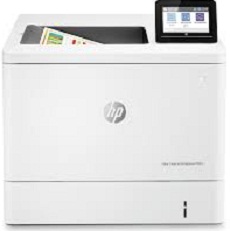
HP Color LaserJet Enterprise M555dn Driver Download
- 11 drivers
- Supports Windows 10
- Windows · macOS · Linux
- ✓ Safe & free
The HP Color LaserJet Enterprise M555dn printer boasts a speedy print rate of 31-40 pages per minute (ppm) for both black and color documents. Designed for small work teams, this Enterprise printer is an excellent choice for those seeking efficient and reliable printing capabilities. While the HP Color LaserJet Enterprise M555dn printer is a print-only device, it offers standard connectivity options such as a hi-speed USB 2.0 port and Ethernet 10/100/1000 Base-TX network, allowing for seamless integration into your existing network infrastructure. For added convenience, the HP Color LaserJet Enterprise M555dn driver supports both Windows and Mac operating systems. So whether you're using a PC or a Mac, you can rest assured that this printer will work seamlessly with your device.
HP Color LaserJet Enterprise M555dn Driver Downloads
| Driver | Operating System | Version | Size | Download |
|---|---|---|---|---|
| Full Feature Driver Recommended | Windows 10Windows 8.1Windows 8Windows 7 | — | 112.2 MB | Download |
| PCL 6 V4 Printer Driver no installer | Windows 10Windows 8.1 | — | 9.4 MB | Download |
| PCL6 Universal Print | Windows 11Windows 10Windows 8.1Windows 8Windows 7 | — | 18.3 MB | Download |
| PCL6 Universal Print | Windows 11Windows 10Windows 8.1Windows 8Windows 7 | — | 20.7 MB | Download |
| PostScript Universal Print | Windows 11Windows 10Windows 8.1Windows 8Windows 7 | — | 19.5 MB | Download |
| PostScript Universal Print | Windows 11Windows 10Windows 8.1Windows 8Windows 7 | — | 21.8 MB | Download |
| USB Connected PCL6 Universal Print | Windows 11Windows 10Windows 8.1Windows 8Windows 7 | — | 18.4 MB | Download |
| USB Connected PCL6 Universal Print | Windows 11Windows 10Windows 8.1Windows 8Windows 7 | — | 20.7 MB | Download |
| USB Connected PostScript Universal Print | Windows 11Windows 10Windows 8.1Windows 8Windows 7 | — | 19.6 MB | Download |
| USB Connected PostScript Universal Print | Windows 11Windows 10Windows 8.1Windows 8Windows 7 | — | 21.9 MB | Download |
| Easy Start | macOS | — | 9.1 MB | Download |
How to Install the HP Color LaserJet Enterprise M555dn Driver
- Click the recommended driver package above and save the file to your PC.
- Open the downloaded file and follow the on-screen HP installer.
- Connect the Color LaserJet Enterprise M555dn by USB or network when prompted.
- Finish and print a test page to confirm the driver works.