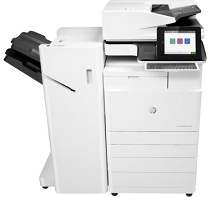
HP Color LaserJet Managed Flow MFP E77830dn Plus Driver Download
- 21 drivers
- Supports Windows 10
- Windows · macOS · Linux
- ✓ Safe & free
The HP Color LaserJet Managed Flow MFP E77830dn Plus boasts an impressive array of features that truly set it apart from the competition. One such feature is its automatic document feeder, or ADF, which allows for effortless, hands-free scanning and copying of multi-page documents. Additionally, the printer is equipped with a frontal USB port, providing seamless connectivity with cameras and other devices. For those with high volume printing needs, the option for high capacity printers is also available. In today's mobile-driven world, the ability to print from a mobile device is essential. The HP Color LaserJet Managed Flow MFP E77830dn Plus offers this feature with support for popular apps such as HP ePrint and Apple AirPrint. Another standout feature of this printer is its ability to scan to mail and scan to PDF, making it easier than ever to digitize important documents. The touchscreen interface is intuitive and user-friendly, allowing for effortless navigation and control of the printer's various functions. Of course, no modern printer would be complete without duplex printing and scanning capabilities. The HP Color LaserJet Managed Flow MFP E77830dn Plus delivers on both fronts, allowing for high-quality, double-sided printing and scanning with ease and efficiency.
HP Color LaserJet Managed Flow MFP E77830dn Plus Driver Downloads
| Driver | Operating System | Version | Size | Download |
|---|---|---|---|---|
| Full Software Solution Recommended | Windows 10Windows 8.1Windows 8Windows 7 | — | 75.4 MB | Download |
| PCL 6 V3 Printer Driver no installer | Windows 10Windows 8.1Windows 8Windows 7 | — | 14.3 MB | Download |
| PCL 6 V4 Printer Driver no installer | Windows 10Windows 8.1 | — | 10.3 MB | Download |
| MFP Network Twain Scan Package | Windows 8.1Windows 8Windows 7 | — | 14.8 MB | Download |
| PCL.6 XPV Printer Driver no installer | Windows VistaWindows XP | — | 14.6 MB | Download |
| Universal Fax | Windows 10Windows 8.1Windows 7 | — | 14.6 MB | Download |
| Universal Fax | Windows 10Windows 8.1Windows 7 | — | 7.6 MB | Download |
| PCL6 Universal Print | Windows 10Windows 8.1Windows 8Windows 7 | — | 17.2 MB | Download |
| PCL6 Universal Print | Windows 10Windows 8.1Windows 8Windows 7 | — | 19.3 MB | Download |
| PostScript Universal Print | Windows 10Windows 8.1Windows 8Windows 7 | — | 18.4 MB | Download |
| PostScript Universal Print | Windows 10Windows 8.1Windows 8Windows 7 | — | 20.4 MB | Download |
| USB Connected PCL6 Universal Print | Windows 10Windows 8.1Windows 8Windows 7 | — | 17.3 MB | Download |
| USB Connected PCL6 Universal Print | Windows 10Windows 8.1Windows 8Windows 7 | — | 19.3 MB | Download |
| USB Connected PostScript Universal Print | Windows 10Windows 8.1Windows 8Windows 7 | — | 18.5 MB | Download |
| USB Connected PostScript Universal Print | Windows 10Windows 8.1Windows 8Windows 7 | — | 20.5 MB | Download |
| Universal Scan Full Feature Driver | Windows 10Windows 8.1Windows 7 | — | 273.9 MB | Download |
| Universal Scan Basic Feature Driver | Windows 10Windows 8.1Windows 7 | — | 57.1 MB | Download |
| Universal Scan Basic Feature Driver | Windows 10Windows 8.1Windows 7 | — | 64.3 MB | Download |
| HP Easy Start Printer Setup | Windows 10Windows 8.1Windows 8Windows 7 | — | 9.4 MB | Download |
| HP Easy Start | macOS | — | 9.1 MB | Download |
| hp helip installer 3.18.5.run | Windows | — | 21.4 MB | Download |
How to Install the HP Color LaserJet Managed Flow MFP E77830dn Plus Driver
- Click the recommended driver package above and save the file to your PC.
- Open the downloaded file and follow the on-screen HP installer.
- Connect the Color LaserJet Managed Flow MFP E77830dn Plus by USB or network when prompted.
- Finish and print a test page to confirm the driver works.