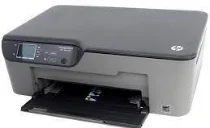
HP Deskjet 3070A Driver Download
- 10 drivers
- Supports Windows
- Windows · macOS · Linux
- ✓ Safe & free
This electronic all-in-one printer boasts three unique models, each with its own set of capabilities. Designed with a moderately small size, it's perfectly suited for both home and office settings, measuring at 146 x 436 x 370 mm (HWD) and weighing just 11 lbs. What sets this printer apart is its use of drop-on-demand Thermal Inkjet Technology, which produces high-quality prints with precision and accuracy. The printer also utilizes a PCL3 GUI language, which makes it easy to navigate and operate. Whether you're printing important documents for work or creating stunning prints for your home, this all-in-one printer is a reliable and efficient choice. With its advanced technology and compact design, it's sure to meet all of your printing needs.
HP Deskjet 3070A Driver Downloads
| Driver | Operating System | Version | Size | Download |
|---|---|---|---|---|
| Full Feature Drivers Recommended | Windows | — | 54.8 MB | Download |
| Basic | Windows 10Windows 8.1Windows 8Windows 7Windows VistaWindows XP | — | 20.7 MB | Download |
| Basic | Windows 10Windows 8.1Windows 8Windows 7Windows Vista | — | 22.3 MB | Download |
| ePrint Software Network and Wireless Connected Printers | Windows 10Windows 8.1Windows 8Windows 7 | — | 26.2 MB | Download |
| ePrint Software Network and Wireless Connected Printers | Windows 10Windows 8.1Windows 8Windows 7 | — | 31.2 MB | Download |
| Easy Start Printer Setup | macOS | — | 9.1 MB | Download |
| Full Feature Drivers | macOS | — | 156.5 MB | Download |
| Full Feature Drivers | macOS | — | 122.1 MB | Download |
| Full Feature Drivers | macOS | — | 104.9 MB | Download |
| ePrint Software Network and Wireless Connected Printers | macOS | — | 6.6 MB | Download |
How to Install the HP Deskjet 3070A Driver
- Click the recommended driver package above and save the file to your PC.
- Open the downloaded file and follow the on-screen HP installer.
- Connect the Deskjet 3070A by USB or network when prompted.
- Finish and print a test page to confirm the driver works.