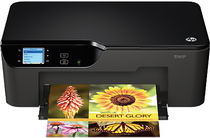
HP Deskjet 3526 Driver Download
- 8 drivers
- Supports Windows
- Windows · macOS · Linux
- ✓ Safe & free
The Deskjet 3526 is a reliable All-in-One printer that offers multifunctional capabilities, making it an excellent choice for home use. With the ability to print, copy, and scan, this printer provides users with an all-encompassing solution for their printing needs. Equipped with a remarkable wireless function, the Deskjet 3526 allows for printing from virtually anywhere, providing unparalleled convenience. This printer is the perfect addition to any home, making completing paperwork a breeze. Say goodbye to the hassle of dealing with multiple machines and hello to the Deskjet 3526, the ultimate all-in-one printing solution. With its exceptional functionality and user-friendly design, this printer is sure to exceed your expectations. Upgrade your home office today with the Deskjet 3526 and experience the convenience of a multifunctional printer like never before.
HP Deskjet 3526 Driver Downloads
| Driver | Operating System | Version | Size | Download |
|---|---|---|---|---|
| Full Feature Drivers Recommended | Windows | — | 67.1 MB | Download |
| Basic | Windows 10Windows 8.1Windows 8Windows 7Windows VistaWindows XP | — | 26.3 MB | Download |
| Basic | Windows 10Windows 8.1Windows 8Windows 7Windows Vista | — | 28.2 MB | Download |
| ePrint Software Network and Wireless Connected Printers | Windows 10Windows 8.1Windows 8Windows 7 | — | 26.2 MB | Download |
| ePrint Software Network and Wireless Connected Printers | Windows 10Windows 8.1Windows 8Windows 7 | — | 31.2 MB | Download |
| Easy Start Printer Setup | macOS | — | 9.1 MB | Download |
| Full Feature Drivers | macOS | — | 142.8 MB | Download |
| Full Feature Drivers | macOS | — | 167.5 MB | Download |
How to Install the HP Deskjet 3526 Driver
- Click the recommended driver package above and save the file to your PC.
- Open the downloaded file and follow the on-screen HP installer.
- Connect the Deskjet 3526 by USB or network when prompted.
- Finish and print a test page to confirm the driver works.