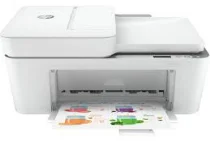
HP DeskJet 4120e Driver Download
- 4 drivers
- Supports Windows
- Windows · macOS · Linux
- ✓ Safe & free
The HP DeskJet 4120e printer is a versatile model that falls under the HP DeskJet 4100 printer series. Along with its printing capabilities, it can also copy, scan, and fax documents. What sets this printer apart is its internal driver that enables automatic duplex printing on both sides of the paper. With this feature, you can save up to 50% of your print resources, making it an ideal choice for those looking to cut down on their expenses. In the box, you'll find a regulatory flyer, setup guide, reference guide, and a power cord. Additionally, the printer comes with HP 67 setup black and tri-color cartridges, ensuring that you have everything you need to get started right away. So, if you're in need of a reliable and efficient printer that can handle all your printing needs, the HP DeskJet 4120e is an excellent choice.
HP DeskJet 4120e Driver Downloads
| Driver | Operating System | Version | Size | Download |
|---|---|---|---|---|
| Full Feature Recommended | Windows | — | 192.4 MB | Download |
| Full feature Driver and Software–Offline Use Only | Windows 11Windows 10Windows 7 | — | — | Download |
| Easy Start Printer Setup | Windows 11Windows 10Windows 8.1Windows 8Windows 7 | — | 11.4 MB | Download |
| Easy Start | macOS | — | 9.1 MB | Download |
How to Install the HP DeskJet 4120e Driver
- Click the recommended driver package above and save the file to your PC.
- Open the downloaded file and follow the on-screen HP installer.
- Connect the DeskJet 4120e by USB or network when prompted.
- Finish and print a test page to confirm the driver works.