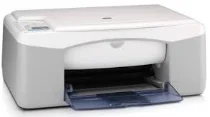
HP Deskjet F340 Driver Download
- 10 drivers
- Supports Windows 10
- Windows · macOS · Linux
- ✓ Safe & free
Belonging to the HP Deskjet F300 printer series, the HP Deskjet F340 printer model is just one of many models in this lineup. Other models included in this series are the F394, F390, F388, F385, F380, F378, F375, F370, F350, and more. Each model has a unique product number that distinguishes it from the others. To use the HP Deskjet F340 printer, users can download and install the compatible driver for their operating system. The HP Deskjet F340 driver is compatible with Windows 98, 98 SE, 2000 SP 3, XP, XP Media, or a tablet edition. For Macintosh users, the compatible versions are Mac OS X v10.3 and v10.4. By providing a wide range of compatible operating systems, the HP Deskjet F340 printer model ensures that users have the flexibility to use their preferred devices. Whether for personal or professional use, this printer series is an excellent choice for high-quality printing needs.Cartridges for the HP Deskjet F340 All-in-One Printer The HP Deskjet F340 All-in-One Printer is a versatile device that can print, scan, and copy all in one compact unit. To keep your printer running smoothly and producing high-quality prints, it's essential to use the right cartridges. We offer a range of cartridges specifically designed for the HP Deskjet F340 All-in-One Printer. Our cartridges are made with high-quality materials and are rigorously tested to ensure they meet our strict standards for performance and reliability. Our cartridges come in a variety of colors and sizes, so you can choose the ones that best suit your needs. We offer both standard and high-yield cartridges, allowing you to get the most out of your printer while minimizing the need for frequent cartridge replacements. With our cartridges, you can be confident that you're getting the best possible print quality and performance from your HP Deskjet F340 All-in-One Printer. So why wait? Order your cartridges today and start enjoying hassle-free printing, scanning, and copying!The HP21 Black Inkjet Print Cartridge (~190 pages), HP 22 Tri-color Original Ink Cartridge (~165 pages), and HP 58 Photo Inkjet Print Cartridge (~140 pages) are all excellent options for your printing needs. These cartridges are designed to provide high-quality prints with crisp, clear images and text. The HP21 Black Inkjet Print Cartridge is perfect for printing documents, reports, and other text-heavy materials. This cartridge is capable of producing up to 190 pages, making it an ideal choice for those who need to print frequently. When it comes to printing colorful materials, the HP 22 Tri-color Original Ink Cartridge is a great choice. This cartridge is designed to produce vibrant, lifelike colors that will make your images stand out. With a page yield of up to 165 pages, this cartridge is perfect for printing photos, brochures, and other materials that require high-quality color output. For those who want to print high-quality photos, the HP 58 Photo Inkjet Print Cartridge is an excellent option. This cartridge is designed to produce stunning, professional-quality photos that will look great in any setting. With a page yield of up to 140 pages, this cartridge is perfect for printing photos for personal or professional use. No matter what your printing needs are, these HP ink cartridges are sure to provide you with the quality and reliability you need. So why wait? Order yours today and start enjoying high-quality prints!.
HP Deskjet F340 Driver Downloads
| Driver | Operating System | Version | Size | Download |
|---|---|---|---|---|
| Full Feature Drivers Recommended | Windows 10Windows 8.1Windows 8 | — | 326.2 MB | Download |
| Full Feature Drivers | Windows 7 | — | 362.7 MB | Download |
| Full Feature Drivers | Windows Vista | — | 163.3 MB | Download |
| Full Feature Drivers | Windows XP | — | 449 MB | Download |
| Basic Drivers | Windows XP | — | 63.1 MB | Download |
| Basic Drivers | Windows XP | — | 45.5 MB | Download |
| Basic Drivers and Software Express Only | Windows XP | — | 358.9 MB | Download |
| Printer | macOS | — | 18.6 MB | Download |
| Full Feature Drivers | macOS | — | 131.1 MB | Download |
| Full Feature Drivers | macOS | — | 182.6 MB | Download |
How to Install the HP Deskjet F340 Driver
- Click the recommended driver package above and save the file to your PC.
- Open the downloaded file and follow the on-screen HP installer.
- Connect the Deskjet F340 by USB or network when prompted.
- Finish and print a test page to confirm the driver works.