HP Deskjet F4140 Driver Download
- 8 drivers
- Supports Windows 10
- Windows · macOS · Linux
- ✓ Safe & free
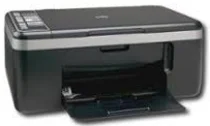
The HP Deskjet F4140 printer model is the first of its kind within the HP Deskjet F4100 printer series. Boasting an alluring design, this multifunction printer is also incredibly portable. This printer model has a variety of features, including the ability to print, copy, and scan documents quickly and with exceptional quality. These features and more make this printer a highly sought after model. Additionally, this machine is versatile enough to be used in a variety of environments, including for personal use or business purposes.HP Deskjet F4140 All-in-One Cartridges are an essential component for optimal printing performance. These cartridges are specifically designed to meet the high demands of inkjet printers and are engineered to deliver sharp, vibrant, and long-lasting prints. With their advanced ink formulas and cutting-edge technology, these cartridges provide consistent and reliable results every time. Whether you're printing documents, photos, or graphics, you can be confident that your prints will come out looking great. In addition to their superior print quality, these cartridges are also incredibly easy to install and replace. They are designed to fit seamlessly into your printer and require minimal effort on your part. When it comes to choosing the right cartridges for your HP Deskjet F4140 All-in-One printer, it's important to choose cartridges that are compatible with your specific model. With a wide range of cartridges available, it's easy to find the perfect cartridges for your printing needs. Overall, HP Deskjet F4140 All-in-One Cartridges are an excellent choice for anyone looking to achieve high-quality prints with minimal hassle. So why wait? Upgrade your printing experience today with these top-of-the-line cartridges!HP21 Black Inkjet Print Cartridge (~190 pages), HP 22 Tri-color Original Ink Cartridge (~165 pages), HP 57 Tri-color Inkjet Print Cartridge (~500 pages), HP 58 Photo Inkjet Print Cartridge (~140 pages).
HP Deskjet F4140 Driver Downloads
| Driver | Operating System | Version | Size | Download |
|---|---|---|---|---|
| Full Feature Drivers Recommended | Windows 10Windows 8.1Windows 8 | — | 218.9 MB | Download |
| Full Feature Drivers | Windows 7 | — | 245.7 MB | Download |
| Full Feature Drivers | Windows VistaWindows XP | — | 162.9 MB | Download |
| Basic | Windows VistaWindows XP | — | 35 MB | Download |
| Multi Function Basic | Windows VistaWindows XP | — | 50.8 MB | Download |
| Printer | macOS | — | 23.6 MB | Download |
| Full Feature Drivers | macOS | — | 135 MB | Download |
| Full Feature Drivers | macOS | — | 182.2 MB | Download |
How to Install the HP Deskjet F4140 Driver
- Click the recommended driver package above and save the file to your PC.
- Open the downloaded file and follow the on-screen HP installer.
- Connect the Deskjet F4140 by USB or network when prompted.
- Finish and print a test page to confirm the driver works.