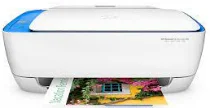
HP DeskJet Ink Advantage 3635 Driver Download
- 8 drivers
- Supports Windows 10
- Windows · macOS · Linux
- ✓ Safe & free
The HP DeskJet Ink Advantage 3635 is a versatile all-in-one printer that's perfect for anyone who needs to print, scan, or copy documents. One of the biggest advantages of this printer is how it simplifies your workflow. The printer's display panel features intuitive icons that make it easy to control all of its functions. You can quickly make simple design changes to the prints that you'll be producing, which can save you time and effort. With the HP DeskJet Ink Advantage 3635 driver, you can easily print from your desktop or laptop PC to any HP ePrinter. This driver streamlines the printing process and ensures that your documents come out looking great every time. Whether you're printing out a report for work or creating a custom design for your business, the HP DeskJet Ink Advantage 3635 is the perfect tool for the job. Its advanced features and user-friendly interface make it a must-have for anyone who needs to produce high-quality prints quickly and efficiently.
HP DeskJet Ink Advantage 3635 Driver Downloads
| Driver | Operating System | Version | Size | Download |
|---|---|---|---|---|
| Full Feature Drivers Recommended | Windows 10Windows 8.1Windows 8Windows 7Windows VistaWindows XP | — | 96.2 MB | Download |
| Basic Drivers IT Professional Use only | Windows 10Windows 8.1Windows 8Windows 7 | — | 45.5 MB | Download |
| Full Feature Drivers | Windows Vista | — | 124.7 MB | Download |
| Basic | Windows Vista | — | 45.5 MB | Download |
| Easy Start Printer Setup | Windows 10Windows 8.1Windows 8Windows 7 | — | 9.4 MB | Download |
| ePrint Software Network and Wireless Connected Printers | Windows 10Windows 8.1Windows 8Windows 7 | — | 26.2 MB | Download |
| ePrint Software Network and Wireless Connected Printers | Windows 10Windows 8.1Windows 8Windows 7 | — | 31.2 MB | Download |
| Easy Start Printer Setup | macOS | — | 9.1 MB | Download |
How to Install the HP DeskJet Ink Advantage 3635 Driver
- Click the recommended driver package above and save the file to your PC.
- Open the downloaded file and follow the on-screen HP installer.
- Connect the DeskJet Ink Advantage 3635 by USB or network when prompted.
- Finish and print a test page to confirm the driver works.