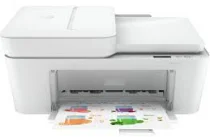
HP DeskJet Ink Advantage 4175 Driver Download
- 4 drivers
- Supports Windows 10
- Windows · macOS · Linux
- ✓ Safe & free
One important aspect to consider when looking at the HP DeskJet Ink Advantage 4175 model is its driver support for manual duplex printing, which allows for double-sided printing. Under optimal conditions, this printer has a print speed of less than ten pages per minute for both color and monochrome documents. Additionally, this machine falls under the Deskjet printer family brand and is primarily geared towards student and primary use. What's more, this printer is equipped with multiple functions, including printing, scanning, and copying, and can even connect to mobile devices for added convenience. With its versatile capabilities, the HP DeskJet Ink Advantage 4175 model is a great option for those seeking a reliable and efficient printer.
HP DeskJet Ink Advantage 4175 Driver Downloads
| Driver | Operating System | Version | Size | Download |
|---|---|---|---|---|
| Full Feature Driver Recommended | Windows 10Windows 8.1Windows 8Windows 7 | — | 192.4 MB | Download |
| Full feature Driver and Software–Offline Use Only | Windows 11Windows 10Windows 7 | — | — | Download |
| Easy Start Printer Setup | Windows 11Windows 10Windows 8.1Windows 8Windows 7 | — | 11.4 MB | Download |
| Easy Start | macOS | — | 9.1 MB | Download |
How to Install the HP DeskJet Ink Advantage 4175 Driver
- Click the recommended driver package above and save the file to your PC.
- Open the downloaded file and follow the on-screen HP installer.
- Connect the DeskJet Ink Advantage 4175 by USB or network when prompted.
- Finish and print a test page to confirm the driver works.