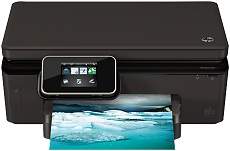
HP Deskjet Ink Advantage 6520 Driver Download
- 8 drivers
- Supports Windows 11
- Windows · macOS · Linux
- ✓ Safe & free
The HP Deskjet Ink Advantage 6520 printer model is an exceptional all-in-one electronic printer that is capable of printing, scanning, and copying documents. This series of printers includes models CZ276A, CZ276B, and CZ276C, each with unique features. The printer boasts a remarkable body build that can blend in seamlessly with any environment and has a user-friendly interface that ensures ease of use. To connect with this printer, you have several options, including the standard USB 2.0 port, wireless direct, and wireless network ports. You can also enjoy the convenience of mobile printing with the Apple AirPrint and HP ePrint features. Moreover, this printer model comes with a specific driver that supports duplex printing, allowing you to print on both sides of a sheet of paper. Overall, the HP Deskjet Ink Advantage 6520 printer model is an excellent choice for anyone looking for a high-quality all-in-one printer with versatile connectivity options and duplex printing capabilities.
HP Deskjet Ink Advantage 6520 Driver Downloads
| Driver | Operating System | Version | Size | Download |
|---|---|---|---|---|
| Full Feature Drivers Recommended | Windows 11Windows 10Windows 8.1Windows 8Windows 7Windows VistaWindows XP | — | 69.7 MB | Download |
| Basic | Windows 10Windows 8.1Windows 8Windows 7Windows VistaWindows XP | — | 26.1 MB | Download |
| Basic | Windows 11Windows 10Windows 8.1Windows 8Windows 7Windows Vista | — | 27.9 MB | Download |
| ePrint Software Network and Wireless Connected Printers | Windows 10Windows 8.1Windows 8Windows 7 | — | 26.2 MB | Download |
| ePrint Software Network and Wireless Connected Printers | Windows 10Windows 8.1Windows 8Windows 7 | — | 31.2 MB | Download |
| HP Easy Start | macOS | — | 9.1 MB | Download |
| Full Feature Drivers | macOS | — | 197.9 MB | Download |
| Full Feature Drivers | macOS | — | 166.3 MB | Download |
How to Install the HP Deskjet Ink Advantage 6520 Driver
- Click the recommended driver package above and save the file to your PC.
- Open the downloaded file and follow the on-screen HP installer.
- Connect the Deskjet Ink Advantage 6520 by USB or network when prompted.
- Finish and print a test page to confirm the driver works.