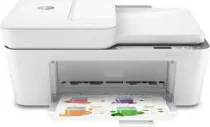
HP DeskJet Plus 4158 Driver Download
- 4 drivers
- Supports Windows 10
- Windows · macOS · Linux
- ✓ Safe & free
The HP DeskJet Plus 4158 is a remarkable all-in-one multifunctional printer that offers excellent features at an affordable price. This printer boasts a hi-speed USB 2.0 port and an inbuilt Wi-Fi 802.11a/b/g/n wireless component for standard connectivity. Additionally, it comes with a standard internal driver that supports printer language and various OS versions. One of the standout features of the HP DeskJet Plus 4158 is its ability to carry out auto enlargement, making it perfect for copying both color and monochrome documents. With this machine, a single original form can produce up to 9 copies, making it incredibly efficient and time-saving. In terms of technical specifications, the HP DeskJet Plus 4158 is compatible with various operating systems, including Windows 10, 8.1, 8, 7, macOS, and Linux. It also supports a range of paper sizes, including A4, B5, A6, and DL envelopes. Overall, the HP DeskJet Plus 4158 is an excellent choice for those looking for a reliable and efficient multifunctional printer that offers outstanding features at an affordable price.
HP DeskJet Plus 4158 Driver Downloads
| Driver | Operating System | Version | Size | Download |
|---|---|---|---|---|
| Full Feature Driver Recommended | Windows 10Windows 8.1Windows 8Windows 7 | — | 192.4 MB | Download |
| Full feature Driver and Software–Offline Use Only | Windows 11Windows 10Windows 7 | — | — | Download |
| Easy Start Printer Setup | Windows 11Windows 10Windows 8.1Windows 8Windows 7 | — | 11.4 MB | Download |
| Easy Start | macOS | — | 9.1 MB | Download |
How to Install the HP DeskJet Plus 4158 Driver
- Click the recommended driver package above and save the file to your PC.
- Open the downloaded file and follow the on-screen HP installer.
- Connect the DeskJet Plus 4158 by USB or network when prompted.
- Finish and print a test page to confirm the driver works.