HP ENVY 4507 Driver Download
- 7 drivers
- Supports Windows 11
- Windows · macOS · Linux
- ✓ Safe & free
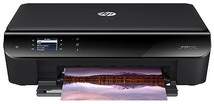
The HP Envy 4507 is an electronic all-in-one device with an ability to not only print, but also copy, and scan. The device’s specific product model number is E6G70B with various connectivity options. These options include wireless connection, a direct wireless connection, and a hi-speed USB 2.0 port.The HP ENVY 4507 printer boasts impressive physical dimensions, measuring 4.72in in height, 17.52in in width, and 13.15in in depth, with a weight of 12.32lbs. When it comes to mobile printing, this printer is compatible with Apple AirPrint and HP ePrint apps, enabling seamless connectivity with smartphones and tablets. These apps provide an efficient and effective solution for printing on-the-go, ensuring that you can easily produce high-quality prints anytime, anywhere.
HP ENVY 4507 Driver Downloads
| Driver | Operating System | Version | Size | Download |
|---|---|---|---|---|
| Full Feature Drivers Recommended | Windows 11Windows 10Windows 8.1Windows 8Windows 7Windows VistaWindows XP | — | 108.3 MB | Download |
| Basic Driver and Software IT Professional Use only | Windows 10Windows 8.1Windows 8Windows 7Windows VistaWindows XP | — | 32.6 MB | Download |
| Basic Driver and Software IT Professional Use only | Windows 11Windows 10Windows 8.1Windows 8Windows 7Windows Vista | — | 34.2 MB | Download |
| ePrint Software Network and Wireless Connected Printers | Windows 10Windows 8.1Windows 8Windows 7 | — | 26.2 MB | Download |
| ePrint Software Network and Wireless Connected Printers | Windows 10Windows 8.1Windows 8Windows 7 | — | 31.2 MB | Download |
| Easy Start Printer Setup | macOS | — | 9.1 MB | Download |
| Full Feature Drivers | macOS | — | 124.5 MB | Download |
How to Install the HP ENVY 4507 Driver
- Click the recommended driver package above and save the file to your PC.
- Open the downloaded file and follow the on-screen HP installer.
- Connect the ENVY 4507 by USB or network when prompted.
- Finish and print a test page to confirm the driver works.