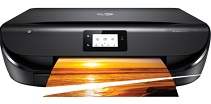
HP ENVY 5000 Driver Download
- 10 drivers
- Supports Windows 11
- Windows · macOS · Linux
- ✓ Safe & free
The HP ENVY 5000 is a family of printers boasting unique designs, ideal for printing, copying, and scanning documents. According to ISO standards, these printers can reach a speed of up to 10 pages per minute (ppm). When printing in draft mode, this rate can soar to 20 ppm, making it an excellent option for high-volume printing. For color documents, the standard printing rate is up to 7 ppm, with the first page taking only 16 seconds to print. The monthly duty cycle of this printer model is up to 1000 pages, although the manufacturer recommends a more moderate usage of 100 to 400 pages. With its versatile capabilities, the HP ENVY 5000 is an excellent choice for businesses and individuals seeking a reliable and efficient printer. Its advanced features ensure that your documents are always printed with the highest quality and accuracy possible.Replacing CartridgesThe HP 304 Black Original Ink Advantage Cartridge with a paper yield of approximately 120 pages and the HP 304 Tri-colour Original Ink Advantage Cartridge with a paper yield of approximately 100 pages are perfect for your printing needs. If you require a higher paper yield, consider the High Yield Black Original Ink Advantage HP 304XL Cartridge which has a paper yield of approximately 300 pages. Alternatively, the High Yield Tri-colour Original Ink Advantage HP 304XL Cartridge is also available with a paper yield of approximately 300 pages. All of these cartridges are designed to provide you with high-quality prints that are both crisp and clear. With their advanced technology, they ensure that your documents will look professional and polished, every time you print. Choose the cartridge that suits your needs and enjoy exceptional print quality with HP.
HP ENVY 5000 Driver Downloads
| Driver | Operating System | Version | Size | Download |
|---|---|---|---|---|
| Full Feature Driver Recommended | Windows 11Windows 10Windows 8.1Windows 8Windows 7 | — | 133.9 MB | Download |
| Full Feature Driver | Windows 11Windows VistaWindows XP | — | — | Download |
| Basic Driver IT Professional Use only | Windows 10Windows 8.1Windows 8Windows 7Windows VistaWindows XP | — | 62.1 MB | Download |
| Basic | Windows 10Windows 8.1Windows 8Windows 7 | — | 66.8 MB | Download |
| Easy Start Printer Setup | Windows 11Windows 10 | — | 11.3 MB | Download |
| Easy Start Printer Setup | Windows 8.1Windows 8 | — | 11.3 MB | Download |
| Easy Start Printer Setup | Windows 7 | — | 11.3 MB | Download |
| HP Smart | macOS | — | 22.6 MB | Download |
| HP Easy Start | macOS | — | 9.1 MB | Download |
| hp helip installer 3.18.9.run | Windows | — | 23.3 MB | Download |
How to Install the HP ENVY 5000 Driver
- Click the recommended driver package above and save the file to your PC.
- Open the downloaded file and follow the on-screen HP installer.
- Connect the ENVY 5000 by USB or network when prompted.
- Finish and print a test page to confirm the driver works.