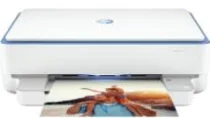
HP ENVY 6010 Driver Download
- 7 drivers
- Supports Windows 10
- Windows · macOS · Linux
- ✓ Safe & free
The HP ENVY 6010 is a multifunctional printer from the HP Envy series that offers printing, copying, and scanning functionality. It features a standard hi-speed USB 2.0 port and a Wi-Fi 802.11ac (dual band) wireless component for seamless connectivity. The printer is also equipped with a standard internal driver for manual duplex printing. In addition to its impressive connectivity options, the HP ENVY 6010 supports several mobile printing services including the HP Smart app, Mopria certification, and Apple Print. These features allow users to easily print from their mobile devices without the need for a computer. Overall, the HP ENVY 6010 is a versatile and convenient printer that offers a range of useful features and connectivity options. Its compatibility with various mobile printing services makes it an ideal choice for users who need to print on-the-go.
HP ENVY 6010 Driver Downloads
| Driver | Operating System | Version | Size | Download |
|---|---|---|---|---|
| Full Feature Driver Recommended | Windows 10Windows 8.1Windows 8Windows 7 | — | 192.3 MB | Download |
| Full feature Driver and Software–Offline Use Only | Windows 11Windows 10Windows 7 | — | — | Download |
| Universal Scan Full Feature Driver | Windows 11Windows 10Windows 8.1Windows 7 | — | 349.8 MB | Download |
| Universal Scan Basic Feature Driver | Windows 10Windows 8.1Windows 7 | — | 84.1 MB | Download |
| Universal Scan Basic Feature Driver | Windows 11Windows 10Windows 8.1Windows 7 | — | 104.8 MB | Download |
| Easy Start Printer Setup | Windows 11Windows 10Windows 8.1Windows 8Windows 7 | — | 11.4 MB | Download |
| Easy Start | macOS | — | 9.1 MB | Download |
How to Install the HP ENVY 6010 Driver
- Click the recommended driver package above and save the file to your PC.
- Open the downloaded file and follow the on-screen HP installer.
- Connect the ENVY 6010 by USB or network when prompted.
- Finish and print a test page to confirm the driver works.