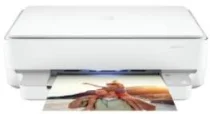
HP ENVY 6020e Driver Download
- 7 drivers
- Supports Windows
- Windows · macOS · Linux
- ✓ Safe & free
The HP ENVY 6020e printer is a versatile all-in-one device that excels at printing, copying, scanning, and faxing documents. This printer boasts an internal print driver that can automatically perform duplex printing, ensuring that your printing tasks are completed quickly and efficiently. With its hi-speed USB 2.0 port and Wi-Fi 802.11ac dual-band component, the HP ENVY 6020e provides a variety of connectivity options that enable users to print from virtually anywhere. Its color and monochrome capabilities allow for up to 9 copies to be produced, making it an excellent choice for both personal and professional use. Additionally, the HP ENVY 6020e's cutting-edge technology ensures that documents are produced with exceptional clarity and precision, making it a top choice for businesses and individuals alike. So if you're looking for a reliable all-in-one printer that can meet all your printing needs, the HP ENVY 6020e is definitely worth considering.
HP ENVY 6020e Driver Downloads
| Driver | Operating System | Version | Size | Download |
|---|---|---|---|---|
| Full Feature Recommended | Windows | — | 192.3 MB | Download |
| Full feature Driver and Software–Offline Use Only | Windows 11Windows 10Windows 7 | — | — | Download |
| Universal Scan Full Feature Driver | Windows 11Windows 10Windows 8.1Windows 7 | — | 349.8 MB | Download |
| Universal Scan Basic Feature Driver | Windows 10Windows 8.1Windows 7 | — | 84.1 MB | Download |
| Universal Scan Basic Feature Driver | Windows 11Windows 10Windows 8.1Windows 7 | — | 104.8 MB | Download |
| Easy Start Printer Setup | Windows 11Windows 10Windows 8.1Windows 8Windows 7 | — | 11.4 MB | Download |
| Easy Start | macOS | — | 9.1 MB | Download |
How to Install the HP ENVY 6020e Driver
- Click the recommended driver package above and save the file to your PC.
- Open the downloaded file and follow the on-screen HP installer.
- Connect the ENVY 6020e by USB or network when prompted.
- Finish and print a test page to confirm the driver works.