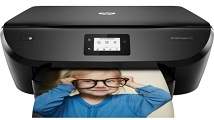
HP ENVY Photo 6255 Driver Download
- 7 drivers
- Supports Windows 11
- Windows · macOS · Linux
- ✓ Safe & free
The HP ENVY Photo 6255 printer is an all-in-one device that boasts an impressive output for printing, scanning, and copying documents. What sets it apart from other printers in the HP Envy series is its unique design, specifically crafted for photo printing. With a product number of K7G18A, the HP ENVY Photo 6255 printer stands out from the crowd. When you purchase this printer, you'll receive everything you need to get started. The printer package box includes the machine itself, an ink caution flyer, a power cord, a setup card, and a getting started guide. You'll also find an instant ink flyer and a media pack, as well as HP 64 setup black and tri-color instant ink ready print cartridges. Whether you're a professional photographer or simply someone who loves to capture memories through photos, the HP ENVY Photo 6255 printer is the perfect choice for high-quality photo printing. With its impressive output and unique design, this printer is sure to impress anyone who sees it in action.Replacing CartridgesIntroducing the HP 303 Black Original Ink Advantage Cartridge, designed to produce approximately 120 pages of crisp, high-quality prints. And for those who demand vivid color in their prints, the HP 303 Tri-colour Original Ink Advantage Cartridge delivers approximately 100 pages of stunningly vibrant hues. For those with high-volume printing needs, the High Yield Black Original Ink Advantage HP 303XL Cartridge is the perfect solution, providing approximately 300 pages of deep blacks and sharp lines. And for those who require a wider range of colors in their prints, the High Yield Tri-colour Original Ink Advantage HP 303XL Cartridge delivers approximately 300 pages of rich, lifelike colors. Trust the Original Ink Advantage Cartridges from HP to consistently produce outstanding results that meet your printing needs. With their advanced ink technology and high page yield, you can be confident in your printing capabilities, whether for personal or professional use. Upgrade your printing experience today with the HP 303 Ink Advantage Cartridges.
HP ENVY Photo 6255 Driver Downloads
| Driver | Operating System | Version | Size | Download |
|---|---|---|---|---|
| Full Feature Driver Recommended | Windows 11Windows 10Windows 8.1Windows 8Windows 7Windows VistaWindows XP | — | 135.4 MB | Download |
| Basic Driver IT Professional Use only | Windows 10Windows 8.1Windows 8Windows 7Windows VistaWindows XP | — | 62.1 MB | Download |
| Basic Driver IT Professional Use only | Windows 11Windows 10Windows 8.1Windows 8Windows 7 | — | 70.5 MB | Download |
| Easy Start Printer Setup | Windows 11Windows 10 | — | 11.3 MB | Download |
| Easy Start Printer Setup | Windows 8.1Windows 8 | — | 11.3 MB | Download |
| Easy Start Printer Setup | Windows 7 | — | 11.3 MB | Download |
| HP Easy Start | macOS | — | 9.1 MB | Download |
How to Install the HP ENVY Photo 6255 Driver
- Click the recommended driver package above and save the file to your PC.
- Open the downloaded file and follow the on-screen HP installer.
- Connect the ENVY Photo 6255 by USB or network when prompted.
- Finish and print a test page to confirm the driver works.