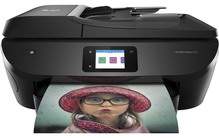
HP ENVY Photo 7830 Driver Download
- 9 drivers
- Supports Windows 11
- Windows · macOS · Linux
- ✓ Safe & free
This multipurpose device is a practical solution for both personal and commercial printing needs. The all-in-one printer offers a range of functions, including scanning, printing, copying, and faxing messages. With a single USB 2.0 port, it can connect to multiple devices and also has the ability to host a thumb drive and WiFi 802.11 b/g/n. For added convenience, it also includes an Ethernet LAN port, RJ-11 fax component, and a dual-band wireless component. The WiFi device is capable of running at 2.4/5 GHz with support for BLE and an SD card slot. With these features, this printer is an excellent choice for anyone seeking a versatile and efficient printing solution.Replacing CartridgesHP 303 Black Ink Cartridge (Paper yield up to 200 pages)HP 303 Tri-colour Ink Cartridge (Paper yield up to ~165 pages)303XL Black Ink Cartridge (Paper yield up to ~600 pages)HP 303XL Tri-colour Ink Cartridge (Paper yield up to ~415 pages).
HP ENVY Photo 7830 Driver Downloads
| Driver | Operating System | Version | Size | Download |
|---|---|---|---|---|
| Full Feature Drivers Recommended | Windows 11Windows 10Windows 8.1Windows 8Windows 7Windows VistaWindows XP | — | 206.2 MB | Download |
| Basic Driver IT Professional Use only | Windows 10Windows 8.1Windows 8Windows 7Windows VistaWindows XP | — | 72 MB | Download |
| Basic Driver IT Professional Use only | Windows 11Windows 10Windows 8.1Windows 8Windows 7 | — | 79.1 MB | Download |
| Universal Fax | Windows 11Windows 10Windows 8.1Windows 7 | — | 16.7 MB | Download |
| Easy Start Printer Setup | Windows 11Windows 10 | — | 11.3 MB | Download |
| Easy Start Printer Setup | Windows 8.1Windows 8 | — | 11.3 MB | Download |
| Easy Start Printer Setup | Windows 7 | — | 11.3 MB | Download |
| Easy Start Printer Setup | macOS | — | 9.1 MB | Download |
| hp helip installer 3.17.9.run | Windows | — | 22.8 MB | Download |
How to Install the HP ENVY Photo 7830 Driver
- Click the recommended driver package above and save the file to your PC.
- Open the downloaded file and follow the on-screen HP installer.
- Connect the ENVY Photo 7830 by USB or network when prompted.
- Finish and print a test page to confirm the driver works.