HP ENVY Pro 6432e Driver Download
- 7 drivers
- Supports Windows 10
- Windows · macOS · Linux
- ✓ Safe & free
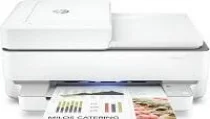
The HP ENVY Pro 6432e printer is a member of the Envy series and is identified by the product number 223R3B. Upon unpacking, two standard cartridges are included - one for black and the other for tri-color. Additional items in the package are a power cord, a reference guide, and a setup guide. To use this device, there are a couple of connectivity options available - the standard USB 2.0 port and a Wi-Fi 802.11 ac dual-band component. These options ensure that the HP ENVY Pro 6432e can easily connect to various devices. One noteworthy feature of this printer is its internal driver, which is quite useful for manual duplex printing. This allows users to print on both sides of a sheet of paper, saving both time and paper. Overall, the HP ENVY Pro 6432e is a versatile and efficient printer that offers both wired and wireless connectivity options, along with the added convenience of manual duplex printing.
HP ENVY Pro 6432e Driver Downloads
| Driver | Operating System | Version | Size | Download |
|---|---|---|---|---|
| Full Feature Driver Recommended | Windows 10Windows 8.1Windows 8Windows 7 | — | 192.3 MB | Download |
| Full feature Driver and Software–Offline Use Only | Windows 11Windows 10Windows 7 | — | — | Download |
| Universal Scan Full Feature Driver | Windows 11Windows 10Windows 8.1Windows 7 | — | 349.8 MB | Download |
| Universal Scan Basic Feature Driver | Windows 10Windows 8.1Windows 7 | — | 84.1 MB | Download |
| Universal Scan Basic Feature Driver | Windows 11Windows 10Windows 8.1Windows 7 | — | 104.8 MB | Download |
| Easy Start Printer Setup | Windows 11Windows 10Windows 8.1Windows 8Windows 7 | — | 11.4 MB | Download |
| Easy Start | macOS | — | 9.1 MB | Download |
How to Install the HP ENVY Pro 6432e Driver
- Click the recommended driver package above and save the file to your PC.
- Open the downloaded file and follow the on-screen HP installer.
- Connect the ENVY Pro 6432e by USB or network when prompted.
- Finish and print a test page to confirm the driver works.