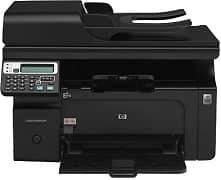
HP HotSpot LaserJet Pro M1218nfs MFP Driver Download
- 4 drivers
- Supports Windows 8.1
- Windows · macOS · Linux
- ✓ Safe & free
The unique identifier for the HP HotSpot LaserJet Pro 1218nfs is B4K88A, and it has attractive physical dimensions. These include 12.0 inches height, 10.4 inches depth, and it supports hi-speed USB 2.0 port, 17.1 inches width and 18.3 lbs of weight. The printer only prints in monochrome. HP HotSpot LaserJet Pro M1218nfs MFP driver does not only print but also copies, scans, sends and receives fax messages.The recommended cartridges for the American region are the HP 85A black, while the HP LaserJet CE285A cartridge is suitable for other areas. The input tray on this printer can hold up to 150 sheets of plain paper, and the output tray can hold up to 100. A unique feature of the M1210 and hotspot M1218nfs series is the automatic document feeder (ADF), which can hold up to 35 sheets. It's important to note that only these two series have the ADF feature.
HP HotSpot LaserJet Pro M1218nfs MFP Driver Downloads
| Driver | Operating System | Version | Size | Download |
|---|---|---|---|---|
| Full Feature Driver Recommended | Windows 8.1Windows 8Windows 7Windows VistaWindows XP | — | 217.7 MB | Download |
| Basic Print | Windows 8.1Windows 8Windows 7Windows VistaWindows XP | — | 9.5 MB | Download |
| Basic Print | Windows 8.1Windows 8Windows 7Windows VistaWindows XP | — | 10.6 MB | Download |
| Full Feature Driver | macOS | — | 66.3 MB | Download |
How to Install the HP HotSpot LaserJet Pro M1218nfs MFP Driver
- Click the recommended driver package above and save the file to your PC.
- Open the downloaded file and follow the on-screen HP installer.
- Connect the HotSpot LaserJet Pro M1218nfs MFP by USB or network when prompted.
- Finish and print a test page to confirm the driver works.