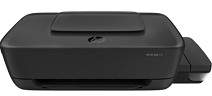
HP Ink Tank 110 Driver Download
- 7 drivers
- Supports Windows 11
- Windows · macOS · Linux
- ✓ Safe & free
The HP Ink Tank 110 printer is a model with the product number 2LB19A and boasts impressive features. Its package comes with HP GT51XL black and tri-color ink bottle cartridges, both of which are exceptional in their own way. The black ink cartridge can produce up to 6000 pages with a volume of 135cc, while the tri-color cartridge has a 70cc capacity and can print up to 8000 pages. In addition to the ink cartridges, the box contains a getting started guide, a setup card, a power cord, and an ink caution flyer. These items are essential in ensuring that the printer is set up correctly and operates efficiently. The HP Ink Tank 110 printer is an ideal choice for professionals who require high-quality prints. Its ink cartridges have a long lifespan, which means you don't have to replace them frequently. Moreover, the printer's setup process is straightforward, and you can start printing in no time. With its impressive properties and accessories, the HP Ink Tank 110 printer is an excellent investment for anyone looking for a reliable printing solution.HP Ink Tank 110 Printer Drivers.
HP Ink Tank 110 Driver Downloads
| Driver | Operating System | Version | Size | Download |
|---|---|---|---|---|
| Full Software Solution Recommended | Windows 11Windows 10Windows 8.1Windows 8Windows 7 | — | 87 MB | Download |
| Basic Software Solution | Windows 10Windows 8.1Windows 8Windows 7 | — | 40.8 MB | Download |
| Basic Software Solution | Windows 11Windows 10Windows 8.1Windows 8Windows 7 | — | 44.4 MB | Download |
| Easy Start Printer Setup | Windows 11Windows 10 | — | 11.3 MB | Download |
| Easy Start Printer Setup | Windows 8.1Windows 8 | — | 11.3 MB | Download |
| Easy Start Printer Setup | Windows 7 | — | 11.3 MB | Download |
| HP Easy Start | macOS | — | 9.1 MB | Download |
How to Install the HP Ink Tank 110 Driver
- Click the recommended driver package above and save the file to your PC.
- Open the downloaded file and follow the on-screen HP installer.
- Connect the Ink Tank 110 by USB or network when prompted.
- Finish and print a test page to confirm the driver works.