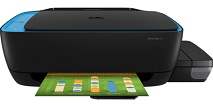
HP Ink Tank 319 Driver Download
- 7 drivers
- Supports Windows 11
- Windows · macOS · Linux
- ✓ Safe & free
The HP Ink Tank 319 is a versatile device that boasts an impressive range of functions, including printing, copying, and scanning documents. The package comes complete with the printer itself, as well as HP GT51 ink cartridges in black, cyan, magenta, and yellow. These cartridges have ample volume, with 90cc of black ink and 70cc of colored ink. To connect and use the printer, simply plug in the full-speed USB 2.0 port. This printer is designed to offer seamless connectivity, allowing you to print, copy, and scan with ease. With its advanced features and high-quality output, the HP Ink Tank 319 is a must-have device for any home or office.HP Ink Tank 319 Replacement cartridgesThe GT51 Black Original Ink Bottle (~4,000 pages), GT51XL 135-ml Black Original Ink Bottle (~6,000 pages), 52 Cyan Original Ink Bottle (~8,000 pages), GT52 Magenta Original Ink Bottle (~8,000 pages), and GT52 Yellow Original Ink Bottle (~8,000 pages) are all available for purchase. These ink bottles offer high quality and long-lasting ink for your printing needs. The GT51 and GT51XL black ink bottles are perfect for producing crisp and clear text, while the 52 Cyan, GT52 Magenta, and GT52 Yellow ink bottles are ideal for creating vibrant and vivid color prints. With page yields ranging from 4,000 to 8,000 pages, these ink bottles provide a cost-effective solution for your printing needs. So, whether you are printing important documents or colorful presentations, these original ink bottles will deliver outstanding results every time.
HP Ink Tank 319 Driver Downloads
| Driver | Operating System | Version | Size | Download |
|---|---|---|---|---|
| Full Software Solution Recommended | Windows 11Windows 10Windows 8.1Windows 8Windows 7Windows VistaWindows XP | — | 123.7 MB | Download |
| Basic Software Solution | Windows 10Windows 8.1Windows 8Windows 7Windows VistaWindows XP | — | 57.1 MB | Download |
| Basic Software Solution | Windows 10Windows 8.1Windows 8Windows 7 | — | 62.5 MB | Download |
| Easy Start Printer Setup | Windows 11Windows 10 | — | 11.3 MB | Download |
| Easy Start Printer Setup | Windows 8.1Windows 8 | — | 11.3 MB | Download |
| Easy Start Printer Setup | Windows 7 | — | 11.3 MB | Download |
| HP Easy Start | macOS | — | 9.1 MB | Download |
How to Install the HP Ink Tank 319 Driver
- Click the recommended driver package above and save the file to your PC.
- Open the downloaded file and follow the on-screen HP installer.
- Connect the Ink Tank 319 by USB or network when prompted.
- Finish and print a test page to confirm the driver works.