HP LaserJet Enterprise MFP M634dn Driver Download
- 20 drivers
- Supports Windows 11
- Windows · macOS · Linux
- ✓ Safe & free
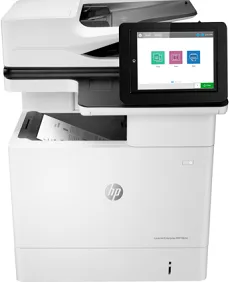
The HP LaserJet Enterprise MFP M634dn printer is a top-of-the-line device equipped with cutting-edge capabilities that enable it to operate at remarkable speeds. With a print speed of over 51 pages per minute (ppm) for black and white documents, this printer is truly impressive. It operates as an Enterprise machine and is equipped with essential features such as printing, scanning, copying, and even optional faxing capabilities. This printer also boasts of an automatic document feeder (ADF), two-sided printing, and scan-to-email functionality, which further enhances its efficiency. Additionally, the HP LaserJet Enterprise MFP M634dn basic series PCL 6 V3 printer driver has a size of 14.31 MB, making it a compact and efficient driver. Overall, the HP LaserJet Enterprise MFP M634dn is a top-notch printer that is designed to meet the needs of businesses and professionals who require fast and reliable printing capabilities. Its state-of-the-art features and impressive speed make it a great choice for any organization looking to improve their printing efficiency.
HP LaserJet Enterprise MFP M634dn Driver Downloads
| Driver | Operating System | Version | Size | Download |
|---|---|---|---|---|
| Full Feature Driver Recommended | Windows 11Windows 10Windows 8.1Windows 8Windows 7 | — | 77.3 MB | Download |
| PCL 6 V3 Printer Driver no installer | Windows 11Windows 10Windows 8.1Windows 8Windows 7 | — | 14.3 MB | Download |
| PCL 6 V4 Printer Driver no installer | Windows 11Windows 10Windows 8.1 | — | 10.3 MB | Download |
| Universal Fax | Windows 11Windows 10Windows 8.1Windows 7 | — | 16.7 MB | Download |
| Universal Fax | Windows 11Windows 10Windows 8.1Windows 7 | — | 8.9 MB | Download |
| PCL6 Universal Print | Windows 11Windows 10Windows 8.1Windows 8Windows 7 | — | 18.3 MB | Download |
| PCL6 Universal Print | Windows 11Windows 10Windows 8.1Windows 8Windows 7 | — | 20.7 MB | Download |
| PostScript Universal Print | Windows 11Windows 10Windows 8.1Windows 8Windows 7 | — | 19.5 MB | Download |
| PostScript Universal Print | Windows 11Windows 10Windows 8.1Windows 8Windows 7 | — | 21.8 MB | Download |
| USB connected PCL6 Universal Print | Windows 11Windows 10Windows 8.1Windows 8Windows 7 | — | 18.4 MB | Download |
| USB connected PCL6 Universal Print | Windows 11Windows 10Windows 8.1Windows 8Windows 7 | — | 20.7 MB | Download |
| USB connected PostScript Universal Print | Windows 11Windows 10Windows 8.1Windows 8Windows 7 | — | 19.6 MB | Download |
| USB connected PostScript Universal Print | Windows 11Windows 10Windows 8.1Windows 8Windows 7 | — | 21.9 MB | Download |
| Universal Scan Full Feature Driver | Windows 11Windows 10Windows 8.1Windows 7 | — | 349.8 MB | Download |
| Universal Scan Basic Feature Driver | Windows 10Windows 8.1Windows 7 | — | 84.1 MB | Download |
| Universal Scan Basic Feature Driver | Windows 11Windows 10Windows 8.1Windows 7 | — | 104.8 MB | Download |
| Easy Start Printer Setup | Windows 11Windows 10 | — | 11.3 MB | Download |
| Easy Start Printer Setup | Windows 8.1Windows 8 | — | 11.3 MB | Download |
| Easy Start Printer Setup | Windows 7 | — | 11.3 MB | Download |
| Easy Start | macOS | — | 9.1 MB | Download |
How to Install the HP LaserJet Enterprise MFP M634dn Driver
- Click the recommended driver package above and save the file to your PC.
- Open the downloaded file and follow the on-screen HP installer.
- Connect the LaserJet Enterprise MFP M634dn by USB or network when prompted.
- Finish and print a test page to confirm the driver works.