HP LaserJet P2035 Driver Download
- 7 drivers
- Supports Windows 10
- Windows · macOS · Linux
- ✓ Safe & free
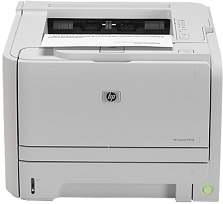
The HP LaserJet P2035 is a fast, efficient and robust working machine that is best for the offices. Its rapid printing capability allows users to save time and also get higher quality prints. It can be placed in tight spaces and gives more space on the desktop. A unique feature of the printer distinct from others is its quiet mode operation.HP LaserJet P2035 toner cartridge.HP05A 2-pack Black Original LaserJet Toner Cartridges (~2300 pages )To operate with Windows XP, a minimum of 512 MB of RAM is required, along with an Intel Pentium II processor and 350 MB of free disk space. The printer is also compatible with Windows Vista, 7, 8, and the latest Windows 10 versions. For Macintosh operating systems, versions Mac OS X 10.3.9 to 10.6 require 128 MB of RAM and 150 MB of free storage. The latest operating system, Mac OS X 10.13, is fully compatible with the printer.
HP LaserJet P2035 Driver Downloads
| Driver | Operating System | Version | Size | Download |
|---|---|---|---|---|
| GDI Plug and Play Package Recommended | Windows 10Windows 8Windows 7Windows VistaWindows XP | — | 4.8 MB | Download |
| GDI Plug and Play Package | Windows 10Windows 8Windows 7Windows VistaWindows XP | — | 5.2 MB | Download |
| XPS Driver Package | Windows Vista | — | 4.1 MB | Download |
| XPS Driver Package | Windows Vista | — | 4.6 MB | Download |
| HP Easy Start | macOS | — | 9.1 MB | Download |
| Printer | macOS | — | 557.4 MB | Download |
| Printer | macOS | — | 547.3 MB | Download |
How to Install the HP LaserJet P2035 Driver
- Click the recommended driver package above and save the file to your PC.
- Open the downloaded file and follow the on-screen HP installer.
- Connect the LaserJet P2035 by USB or network when prompted.
- Finish and print a test page to confirm the driver works.