HP LaserJet Pro M403d Driver Download
- 8 drivers
- Supports Windows 10
- Windows · macOS · Linux
- ✓ Safe & free
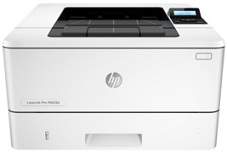
One of the most notable features of this printer lies in its aesthetically pleasing design and compact size, making it suitable for both personal and professional use. The printer's physical components consist of a 2-line backlit control panel and a power on/off button, as well as a front door release button that provides easy access to the toner cartridge.The printer boasts an output tray extension, which effectively curbs the risk of printed pages slipping off the tray. The supported media types are diverse and include plain sheets, transparencies, index cards, legal papers, and envelopes. These media types come in a range of sizes, encompassing both standard and custom dimensions.When it comes to accessories, the printer requires essential cartridges like the HP 28A black original LaserJet Toner cartridge (part number CF228A). For those who need more toner, the HP 28X High Yield Black Original LaserJet Toner Cartridge (part number CF228X) is also compatible. In addition, the printer features a hi-speed USB interface port, a power connection port, and a tray two dust cover.
HP LaserJet Pro M403d Driver Downloads
| Driver | Operating System | Version | Size | Download |
|---|---|---|---|---|
| PCL 6 V3 Full Solution Recommended | Windows 10Windows 8.1Windows 8 | — | 75.6 MB | Download |
| Full Solution Drivers | Windows 7 | — | 88.6 MB | Download |
| PCL 6 V3 Print Driver no installer | Windows 10Windows 8.1Windows 8Windows 7 | — | 11.1 MB | Download |
| PCL 6 v4 Print Driver no installer | Windows 10Windows 8.1Windows 8 | — | 9.5 MB | Download |
| PCL.6 Print Driver no installer | Windows VistaWindows XP | — | 14.6 MB | Download |
| PCL 6 v3 Print | Windows 7 | — | 74 MB | Download |
| PCL.6 Printer | Windows VistaWindows XP | — | 75.6 MB | Download |
| Easy Start Printer Setup | macOS | — | 9.1 MB | Download |
How to Install the HP LaserJet Pro M403d Driver
- Click the recommended driver package above and save the file to your PC.
- Open the downloaded file and follow the on-screen HP installer.
- Connect the LaserJet Pro M403d by USB or network when prompted.
- Finish and print a test page to confirm the driver works.