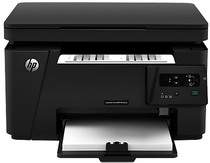
HP LaserJet Pro MFP M125ra Driver Download
- 6 drivers
- Supports Windows 10
- Windows · macOS · Linux
- ✓ Safe & free
The product number is CZ177A for the HP LaserJet Pro MFP M125ra model, which characteristically has rear hi-speed USB 2.0 port. It also does not have mobile printing features and does not support HP ePrint and Apple AirPrint. The measured dimensions of the printer with closed doors and trays include a height of 10 inches. Also, 17.2 inches of depth, a width of 16.5 inches and a weight of 18.3 lbs.In terms of paper specifications, the printer boasts a primary input tray that accommodates up to 150 sheets of plain paper. Meanwhile, the output tray can hold up to 100 sheets of printed pages. It's worth noting that the printer supports a range of media types, including transparencies, envelopes, legal-sized paper, and postcards. These alternative paper sizes require less space to fill any of the trays.
HP LaserJet Pro MFP M125ra Driver Downloads
| Driver | Operating System | Version | Size | Download |
|---|---|---|---|---|
| Full Solution Drivers Recommended | Windows 10Windows 8.1Windows 8Windows 7Windows VistaWindows XP | — | 108.8 MB | Download |
| PCLm Print | Windows 10Windows 8.1Windows 8Windows 7Windows VistaWindows XP | — | 88 MB | Download |
| PCLm Driver Only no Installer | Windows 8.1Windows 8Windows 7Windows VistaWindows XP | — | 15.1 MB | Download |
| Easy Start Printer Setup | macOS | — | 9.1 MB | Download |
| Full Solution Drivers | macOS | — | 139.8 MB | Download |
| Software Update for Scanning issues | macOS | — | 146.7 MB | Download |
How to Install the HP LaserJet Pro MFP M125ra Driver
- Click the recommended driver package above and save the file to your PC.
- Open the downloaded file and follow the on-screen HP installer.
- Connect the LaserJet Pro MFP M125ra by USB or network when prompted.
- Finish and print a test page to confirm the driver works.