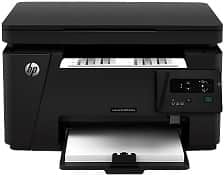
HP LaserJet Pro MFP M126a Driver Download
- 6 drivers
- Supports Windows 10
- Windows · macOS · Linux
- ✓ Safe & free
The printer model, LaserJet Pro MFP M126a has a model number CZ174A. This model belongs to the M125 and the M126 series. The physical dimensions are a height of 10 inches, a width of 16.5 inches, a depth of 17.2 inches and a weight of 18.3 lbs.The HP LaserJet Pro MFP M126a boasts a limited range of connectivity options, with only a standard hi-speed USB port located at the rear of the device. Unfortunately, this printer lacks both Wireless and Ethernet LAN features, severely limiting its flexibility in terms of network connectivity. Furthermore, users will find that this printer is not capable of printing directly from mobile devices. It is important to note that while the printer's USB port may suffice for some users, those who require more versatile connectivity options may need to consider alternative models.
HP LaserJet Pro MFP M126a Driver Downloads
| Driver | Operating System | Version | Size | Download |
|---|---|---|---|---|
| Full Solution Drivers Recommended | Windows 10Windows 8.1Windows 8Windows 7Windows VistaWindows XP | — | 108.8 MB | Download |
| PCLm Driver Only no Installer | Windows 8.1Windows 8Windows 7Windows VistaWindows XP | — | 15.1 MB | Download |
| PCLm Print | Windows 10Windows 8.1Windows 8Windows 7Windows VistaWindows XP | — | 88 MB | Download |
| Easy Start Printer Setup | macOS | — | 9.1 MB | Download |
| Full Solution Drivers | macOS | — | 139.8 MB | Download |
| Software Update for Scanning issues | macOS | — | 146.7 MB | Download |
How to Install the HP LaserJet Pro MFP M126a Driver
- Click the recommended driver package above and save the file to your PC.
- Open the downloaded file and follow the on-screen HP installer.
- Connect the LaserJet Pro MFP M126a by USB or network when prompted.
- Finish and print a test page to confirm the driver works.