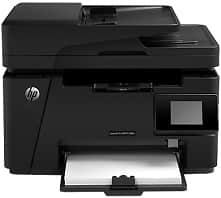
HP LaserJet Pro MFP M128fw Driver Download
- 9 drivers
- Supports Windows 10
- Windows · macOS · Linux
- ✓ Safe & free
The HP LaserJet Pro MFP M128fw is a multifunctional printer that offers a plethora of features including printing, scanning, copying, as well as sending and receiving fax messages. With an input tray capacity of up to 150 sheets of plain paper, this printer can handle large print jobs with ease. The output tray can hold approximately 100 sheets of printed pages, ensuring that you won't have to constantly refill it. Additionally, it comes equipped with a short paper extender and an automatic document feeder, providing convenience and efficiency when dealing with large volumes of paperwork.The HP LaserJet Pro MFP M128fw printer boasts a range of connectivity options, including the hi-speed USB 2.0 port, 10/100/1000T Ethernet LAN connection, and wireless network connection. It is compatible with the HP PCLm5 driver, providing users with a seamless and efficient printing experience. At the heart of the printer is an impressive 128 MB of RAM, which ensures fast and reliable performance. The control panel is a color graphical touchscreen display, making it easy for users to navigate through the various settings and options. Whether you need to print documents, photos, or graphics, the HP LaserJet Pro MFP M128fw printer is the perfect choice for any office or home setting. With its versatile connectivity options and high-quality output, it is sure to meet all of your printing needs with ease.
HP LaserJet Pro MFP M128fw Driver Downloads
| Driver | Operating System | Version | Size | Download |
|---|---|---|---|---|
| Full Solution Drivers Recommended | Windows 10Windows 8.1Windows 8Windows 7Windows VistaWindows XP | — | 125.2 MB | Download |
| PCLm Driver Only no Installer | Windows 10Windows 8.1Windows 8Windows 7Windows VistaWindows XP | — | 15.1 MB | Download |
| PCLm Print | Windows 10Windows 8.1Windows 8Windows 7Windows VistaWindows XP | — | 87.2 MB | Download |
| Universal Fax | Windows 8.1Windows 8Windows 7Windows VistaWindows XP | — | 11.3 MB | Download |
| ePrint Software Network and Wireless Connected Printers | Windows 10Windows 8.1Windows 8Windows 7 | — | 26.2 MB | Download |
| ePrint Software Network and Wireless Connected Printers | Windows 10Windows 8.1Windows 8Windows 7 | — | 31.2 MB | Download |
| Easy Start Printer Setup | macOS | — | 9.1 MB | Download |
| Full Solution Drivers | macOS | — | 139.8 MB | Download |
| Software Update for Scanning issues | macOS | — | 146.7 MB | Download |
How to Install the HP LaserJet Pro MFP M128fw Driver
- Click the recommended driver package above and save the file to your PC.
- Open the downloaded file and follow the on-screen HP installer.
- Connect the LaserJet Pro MFP M128fw by USB or network when prompted.
- Finish and print a test page to confirm the driver works.