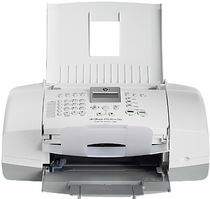
HP Officejet 4314 Driver Download
- 10 drivers
- Supports Windows Vista
- Windows · macOS · Linux
- ✓ Safe & free
The HP Officejet 4314 is a versatile office printer designed for a variety of tasks, including printing, scanning, faxing, and copying. With the ability to perform all of these functions in both mono and color formats, this printer is an asset to any office. What sets the HP Officejet 4314 apart is its exceptional photo quality, thanks to its six ink cartridges. This printer utilizes drop-on-demand thermal inkjet technology to produce crisp, clear images with stunning color accuracy. With a duty cycle of 1000 pages per month, the HP Officejet 4314 is built to withstand heavy usage in a busy office environment. Its multifunction capabilities and high-quality output make it an ideal choice for businesses of all sizes. Invest in the HP Officejet 4314 for a reliable and efficient office printer that can handle all of your printing needs, from basic documents to stunning photographs.HP Officejet 4314.
HP Officejet 4314 Driver Downloads
| Driver | Operating System | Version | Size | Download |
|---|---|---|---|---|
| Full Feature Drivers Recommended | Windows Vista | — | 163.3 MB | Download |
| Full Feature Drivers | Windows XP | — | 478.5 MB | Download |
| Full Feature Drivers | Windows XP | — | 449 MB | Download |
| Basic Drivers | Windows XP | — | 63.1 MB | Download |
| Basic Drivers | Windows XP | — | 45.5 MB | Download |
| Multi Function Products Driver Bundle Corporate Only | Windows XP | — | 55.6 MB | Download |
| Multi Function Products Driver Bundle Corporate Only | Windows XP | — | 49.9 MB | Download |
| Printer | macOS | — | 18.6 MB | Download |
| Full Feature Drivers | macOS | — | 131.1 MB | Download |
| Full Feature Drivers | macOS | — | 188.1 MB | Download |
How to Install the HP Officejet 4314 Driver
- Click the recommended driver package above and save the file to your PC.
- Open the downloaded file and follow the on-screen HP installer.
- Connect the Officejet 4314 by USB or network when prompted.
- Finish and print a test page to confirm the driver works.