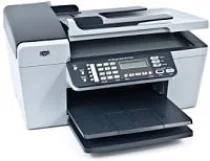
HP Officejet 5610v Driver Download
- 7 drivers
- Supports Windows 10
- Windows · macOS · Linux
- ✓ Safe & free
The Officejet 5610v driver is available for download on Microsoft Windows 32-bit – 64-bit and Macintosh Operating System. With this essential driver, users can enjoy optimal performance and efficient functionality from their Officejet 5610v printer. Whether you need to print, scan, or copy documents, this driver ensures that your printer is running smoothly and delivers the best possible results. Downloading the Officejet 5610v driver is a straightforward process that can be completed in just a few clicks. Simply follow the link provided to access the driver download page, select your operating system, and download the correct version of the driver for your device. With this driver installed, you can be sure that your printer will always be ready for any printing task. So, if you want to get the most out of your Officejet 5610v printer, be sure to download and install the latest driver today. With its advanced features and cutting-edge technology, this driver is the key to unlocking the full potential of your device and taking your printing experience to the next level.
HP Officejet 5610v Driver Downloads
| Driver | Operating System | Version | Size | Download |
|---|---|---|---|---|
| Full Feature Drivers Recommended | Windows 10Windows 8.1Windows 8 | — | 326.2 MB | Download |
| Full Feature Drivers | Windows 7 | — | 362.7 MB | Download |
| Full Feature Drivers | Windows Vista | — | 163.3 MB | Download |
| Basic | Windows XP | — | 71 MB | Download |
| Printer | macOS | — | 18.6 MB | Download |
| Full Feature Drivers | macOS | — | 131.1 MB | Download |
| Full Feature Drivers | macOS | — | 174.8 MB | Download |
How to Install the HP Officejet 5610v Driver
- Click the recommended driver package above and save the file to your PC.
- Open the downloaded file and follow the on-screen HP installer.
- Connect the Officejet 5610v by USB or network when prompted.
- Finish and print a test page to confirm the driver works.