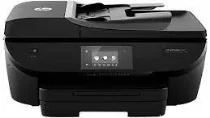
HP Officejet 5742 Driver Download
- 15 drivers
- Supports Windows 10
- Windows · macOS · Linux
- ✓ Safe & free
The HP Officejet 5742 is a highly efficient all-in-one printer that can print, fax, copy, and scan documents with ease. To connect with this machine, you have the option of wireless direct printing, memory card slot, or the standard USB connection. In order to utilize these features, you will need to have a USB 2.0 port, Wi-Fi 802.11b/g/n, Ethernet port, or RJ-11 fax available. With these connectivity options, you can easily print documents from any device in your network. When it comes to copying documents, the HP Officejet 5742 is lightning fast. In draft mode, it can copy up to 19 pages per minute (CPM) on an A4 paper. This makes it an excellent choice for busy offices or anyone who needs to copy documents quickly and efficiently. Overall, the HP Officejet 5742 is a versatile and reliable printer that is perfect for anyone who needs to print, fax, copy, or scan documents on a regular basis. Its advanced features and lightning-fast copying abilities make it a must-have for any modern office.The HP Officejet 5742 printer cartridges are a vital component for producing high-quality prints. These cartridges are designed to work seamlessly with the HP Officejet 5742 printer, ensuring consistent and reliable performance. Whether you require black or color ink, the HP Officejet 5742 cartridges are available in a range of sizes and types to meet your needs. From standard to high-yield cartridges, you can choose the one that best suits your printing requirements. The HP Officejet 5742 cartridges utilize advanced ink technology to produce sharp, vibrant, and long-lasting prints. The high-quality ink ensures that your documents and images are crisp and clear, with accurate colors that remain true over time. Additionally, the HP Officejet 5742 cartridges feature smart technology that monitors ink levels and alerts you when it's time to replace the cartridge. This helps to avoid running out of ink unexpectedly and ensures that you always have a spare cartridge on hand. In summary, the HP Officejet 5742 cartridges are an essential component for producing high-quality prints with your HP Officejet 5742 printer. Choose the right cartridge for your needs and enjoy consistent, reliable performance and outstanding print quality.HP62 Black Original Ink Cartridge (~200 pages), HP 62 Tri-color Original Ink Cartridge (~165 pages).
HP Officejet 5742 Driver Downloads
| Driver | Operating System | Version | Size | Download |
|---|---|---|---|---|
| Full Feature Drivers Recommended | Windows 10Windows 8.1Windows 8Windows 7 | — | 146.3 MB | Download |
| Full Feature Drivers | Windows VistaWindows XP | — | 143.8 MB | Download |
| Full Feature Drivers | Windows Vista | — | 179.3 MB | Download |
| Basic | Windows 10Windows 8.1Windows 8Windows 7 | — | 51.4 MB | Download |
| Basic | Windows 10Windows 8.1Windows 8Windows 7 | — | 54.2 MB | Download |
| Basic | Windows VistaWindows XP | — | 48.6 MB | Download |
| Basic | Windows Vista | — | 45.2 MB | Download |
| Universal Fax | Windows 8.1Windows 8Windows 7Windows VistaWindows XP | — | 11.3 MB | Download |
| Universal Fax Driver XP and Vista Support | Windows | — | 14.6 MB | Download |
| Easy Start Printer Setup | Windows 10Windows 7 | — | 9.8 MB | Download |
| Easy Start Printer Setup | Windows 8.1Windows 8 | — | 9.8 MB | Download |
| ePrint Software Network and Wireless Connected Printers | Windows 10Windows 8.1Windows 8Windows 7 | — | 26.2 MB | Download |
| ePrint Software Network and Wireless Connected Printers | Windows 10Windows 8.1Windows 8Windows 7 | — | 31.2 MB | Download |
| Easy Start Printer Setup | macOS | — | 9.1 MB | Download |
| Full Feature Drivers | macOS | — | 155.7 MB | Download |
How to Install the HP Officejet 5742 Driver
- Click the recommended driver package above and save the file to your PC.
- Open the downloaded file and follow the on-screen HP installer.
- Connect the Officejet 5742 by USB or network when prompted.
- Finish and print a test page to confirm the driver works.