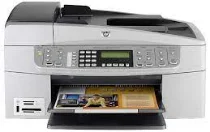
HP Officejet 6315 Driver Download
- 11 drivers
- Supports Windows 10
- Windows · macOS · Linux
- ✓ Safe & free
HP Officejet 6315 All-in-One Printer cartridges The HP Officejet 6315 All-in-One Printer is a versatile printer that can handle a variety of tasks such as printing, scanning, copying, and faxing. However, the printer is only as good as the cartridges it uses. The cartridges are responsible for creating high-quality prints and ensuring the printer runs smoothly. When it comes to choosing the right cartridges for your HP Officejet 6315 All-in-One Printer, there are a few things to consider. First, you need to determine the type of cartridge your printer uses. The HP Officejet 6315 All-in-One Printer uses HP 98 and HP 95 cartridges. Next, you need to decide between original HP cartridges and third-party cartridges. Original HP cartridges are designed specifically for your printer and are guaranteed to work seamlessly with your device. Third-party cartridges, on the other hand, are often cheaper but may not provide the same level of quality and reliability as original cartridges. It's also important to consider the yield of the cartridges. The yield refers to the number of pages a cartridge can print before it needs to be replaced. Higher yield cartridges are more cost-effective in the long run as they require less frequent replacements. In summary, choosing the right cartridges for your HP Officejet 6315 All-in-One Printer is crucial for achieving high-quality prints and ensuring the smooth operation of your device. Consider the type of cartridge, original vs. third-party options, and the yield when making your decision.HP98 Black Original Ink Cartridge (~420 pages), HP 93 Tri-color Ink Cartridge (~330 pages).
HP Officejet 6315 Driver Downloads
| Driver | Operating System | Version | Size | Download |
|---|---|---|---|---|
| Full Feature Drivers Recommended | Windows 10Windows 8.1Windows 8 | — | 327.9 MB | Download |
| Full Feature Drivers | Windows 7 | — | 362.7 MB | Download |
| Full Feature Drivers | Windows Vista | — | 163.3 MB | Download |
| Full Feature Drivers | Windows XP | — | 507 MB | Download |
| Full Feature Drivers | Windows XP | — | 473.8 MB | Download |
| Multi Function Products | Windows XP | — | 55.6 MB | Download |
| Multi Function Products | Windows XP | — | 49.9 MB | Download |
| Basic Print and Scan | Windows XP | — | 70.3 MB | Download |
| Basic Print and Scan | Windows XP | — | 51.5 MB | Download |
| Full Feature Drivers | macOS | — | 145.6 MB | Download |
| Full Feature Drivers | macOS | — | 191.2 MB | Download |
How to Install the HP Officejet 6315 Driver
- Click the recommended driver package above and save the file to your PC.
- Open the downloaded file and follow the on-screen HP installer.
- Connect the Officejet 6315 by USB or network when prompted.
- Finish and print a test page to confirm the driver works.