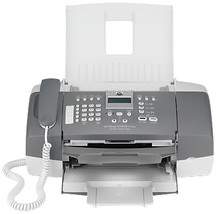
HP Officejet J3508 Driver Download
- 5 drivers
- Supports Windows 10
- Windows · macOS · Linux
- ✓ Safe & free
The HP Officejet J3508, with a part number of CB067A, boasts impressive aesthetics and design, making it perfect for both personal and commercial purposes. Its dimensions measure a height of approximately 13 inches, a width of 16.4 inches, and a depth of about 8 inches. Weighing in at a mere 12 pounds, it is light enough to rest comfortably on any office or study desk. This device is not just aesthetically pleasing, but also highly functional with a range of features designed to enhance productivity. Its compact size belies the powerful capabilities it possesses, making it an ideal choice for modern workplaces. The HP Officejet J3508 is an excellent example of a device that is both stylish and practical. Its unique design and impressive specifications make it an excellent choice for anyone seeking a high-quality printer that can handle a wide range of tasks. Its part number of CB067A further reinforces its status as a top-of-the-line device, one that is sure to impress even the most discerning of users.
HP Officejet J3508 Driver Downloads
| Driver | Operating System | Version | Size | Download |
|---|---|---|---|---|
| Full Feature Driver Recommended | Windows 10Windows 8.1Windows 8 | — | 204.6 MB | Download |
| Full Feature Driver | Windows 7 | — | 221 MB | Download |
| Full Feature Driver | Windows VistaWindows XP | — | 242 MB | Download |
| Basic Print and Scan | Windows 7 | — | 129 MB | Download |
| Basic | Windows VistaWindows XP | — | 76.7 MB | Download |
How to Install the HP Officejet J3508 Driver
- Click the recommended driver package above and save the file to your PC.
- Open the downloaded file and follow the on-screen HP installer.
- Connect the Officejet J3508 by USB or network when prompted.
- Finish and print a test page to confirm the driver works.