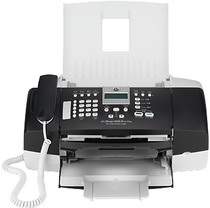
HP Officejet J3608 Driver Download
- 5 drivers
- Supports Windows 10
- Windows · macOS · Linux
- ✓ Safe & free
The HP Officejet J3608 is a highly compact and advanced printer that offers faxing capabilities. With this printer, you can easily scan, print, copy, and fax documents, or even use it as a phone. It boasts a printing speed of 20 pages per minute for black and 14 pages per minute for color, making it a fast and efficient choice for any office setting. In addition to its impressive printing capabilities, the HP Officejet J3608 also offers full color faxing capabilities and scanning features that can reach up to 1200 dots per inch with a document feeder. This ensures that your documents are captured and printed with the utmost clarity and quality. Overall, the HP Officejet J3608 is an excellent choice for anyone looking for a compact and versatile printer that can handle a wide range of tasks with ease. Whether you need to print, scan, copy, or fax documents, this printer has you covered.
HP Officejet J3608 Driver Downloads
| Driver | Operating System | Version | Size | Download |
|---|---|---|---|---|
| Full Feature Drivers Recommended | Windows 10Windows 8.1Windows 8 | — | 212.3 MB | Download |
| Full Feature Drivers | Windows 7Windows VistaWindows XP | — | 239.4 MB | Download |
| Basic Print and Scan | Windows 7Windows VistaWindows XP | — | 114.2 MB | Download |
| Full Feature Drivers | macOS | — | 139.3 MB | Download |
| Full Feature Drivers | macOS | — | 177.1 MB | Download |
How to Install the HP Officejet J3608 Driver
- Click the recommended driver package above and save the file to your PC.
- Open the downloaded file and follow the on-screen HP installer.
- Connect the Officejet J3608 by USB or network when prompted.
- Finish and print a test page to confirm the driver works.