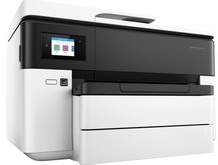
HP OfficeJet Pro 7730 Driver Download
- 9 drivers
- Supports Windows 11
- Windows · macOS · Linux
- ✓ Safe & free
The product, HP Officejet Pro 7730 is a wide-format printer with a multifunctional ability to print, copy, and scan documents. The product number is Y0S19A, and it separates this printer model from other HP printers. The product has one compatible USB hi-speed port with USB 3.0 devices and one Ethernet LAN port. Other components include one Wireless 802.11 b/g/n and two RJ-11 modem ports. The printer uses four different cartridges for cyan, black, magenta, and yellow colors.Replacing CartridgesHP 953 Black Ink Cartridge (Paper yield ~ 1,000 pages)HP 953 Cyan Ink Cartridge (Paper yield ~ 700 pages)Magenta Ink Cartridge HP 953 (Paper yield ~ 700 pages)HP 953 Yellow Ink Cartridge (Paper yield ~ 700 pages)HP 953XL Black Ink Cartridge (Paper yield ~ 2,000 pages)Cyan Ink Cartridge HP 953XL (Paper yield ~ 1,600 pages)HP 953XL Magenta Ink Cartridge (Paper yield ~ 1,600 pages)HP 953XL Yellow Ink Cartridge (Paper yield ~ 1,600 pages)Black Ink Cartridge HP 953XL (Paper yield ~ 3,000 pages).
HP OfficeJet Pro 7730 Driver Downloads
| Driver | Operating System | Version | Size | Download |
|---|---|---|---|---|
| Full Feature Drivers Recommended | Windows 11Windows 10Windows 8.1Windows 8Windows 7 | — | 205.9 MB | Download |
| Basic | Windows 10Windows 8.1Windows 8Windows 7Windows VistaWindows XP | — | 68.2 MB | Download |
| Basic | Windows 10Windows 8.1Windows 8Windows 7 | — | 75 MB | Download |
| Universal Fax | Windows 11Windows 10Windows 8.1Windows 7 | — | 16.7 MB | Download |
| Easy Start Printer Setup | Windows 11Windows 10 | — | 11.3 MB | Download |
| Easy Start Printer Setup | Windows 8.1Windows 8 | — | 11.3 MB | Download |
| Easy Start Printer Setup | Windows 7 | — | 11.3 MB | Download |
| Easy Start Printer Setup | macOS | — | 9.1 MB | Download |
| hp helip installer 3.17.9.run | Windows | — | 22.8 MB | Download |
How to Install the HP OfficeJet Pro 7730 Driver
- Click the recommended driver package above and save the file to your PC.
- Open the downloaded file and follow the on-screen HP installer.
- Connect the OfficeJet Pro 7730 by USB or network when prompted.
- Finish and print a test page to confirm the driver works.