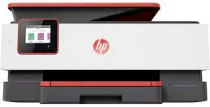
HP OfficeJet Pro 8035 Driver Download
- 4 drivers
- Supports Windows 11
- Windows · macOS · Linux
- ✓ Safe & free
The HP OfficeJet Pro 8035 is a multifunctional printer that belongs to the HP OfficeJet Pro 8030 series. This printer is equipped with the capability to print, copy, scan, and fax documents, providing you with optimal output quality that is sure to impress. With a range of connectivity options available, including a standard USB 2.0 hi-speed port, an Ethernet port, one Wireless 802.11b/g/n, and an RJ-11 Fax component, this printer is designed to support your business needs. Copying with this device is made easy with a variety of settings such as the number of copies, resize options, output quality, contrast adjustment for lighter/darker prints, and paper size. Despite its impressive capabilities, the HP OfficeJet Pro 8035 is surprisingly compact, making it the perfect addition to any office space. Plus, it supports the HP OfficeJet Pro 8035 Full Feature Driver for Windows, ensuring seamless integration with your existing systems. In short, the HP OfficeJet Pro 8035 printer is a versatile and efficient solution for all your printing needs.
HP OfficeJet Pro 8035 Driver Downloads
| Driver | Operating System | Version | Size | Download |
|---|---|---|---|---|
| Full Feature Driver Recommended | Windows 11Windows 10Windows 8.1Windows 8Windows 7 | — | 208.3 MB | Download |
| Universal Fax | Windows 11Windows 10Windows 8.1Windows 7 | — | 16.7 MB | Download |
| Easy Start Printer Setup | Windows 11Windows 10Windows 8.1Windows 8Windows 7 | — | 11.4 MB | Download |
| Easy Start | macOS | — | 9.1 MB | Download |
How to Install the HP OfficeJet Pro 8035 Driver
- Click the recommended driver package above and save the file to your PC.
- Open the downloaded file and follow the on-screen HP installer.
- Connect the OfficeJet Pro 8035 by USB or network when prompted.
- Finish and print a test page to confirm the driver works.