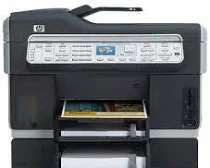
HP Officejet Pro L7780 Driver Download
- 13 drivers
- Supports Windows 10
- Windows · macOS · Linux
- ✓ Safe & free
The HP Officejet Pro L7780 printer model is part of the HP Officejet Pro L7700 family series, which is closely related to the HP Officejet Pro L7600 and HP Officejet Pro L7600 printer series. These printers boast a range of unique features that set them apart from their competitors. In addition to their multifunctional capabilities, including printing, copying, scanning, and faxing documents, each printer in this series has its own unique identification code. One of the standout features of the HP Officejet Pro L7780 printer model is its high-quality printing capabilities, which utilize advanced inkjet technology to produce crisp, clear documents. This printer also boasts a range of connectivity options, including Wi-Fi and Bluetooth, making it easy to print from a variety of devices. Another noteworthy aspect of the HP Officejet Pro L7780 printer is its robust security features, which include encryption and password protection to ensure that sensitive documents remain secure. This printer also has a large paper capacity and fast printing speeds, making it ideal for busy office environments. Overall, the HP Officejet Pro L7780 printer model is an excellent choice for those in need of a reliable, high-quality printer that can handle a range of tasks with ease. With its advanced features and exceptional performance, this printer is sure to exceed your expectations.
HP Officejet Pro L7780 Driver Downloads
| Driver | Operating System | Version | Size | Download |
|---|---|---|---|---|
| Full Feature Drivers Recommended | Windows 10Windows 8.1Windows 8 | — | 285.8 MB | Download |
| Full Feature Drivers | Windows 7Windows VistaWindows XP | — | 385.3 MB | Download |
| Basic Driver IT Professional Use Only | Windows 8.1Windows 8 | — | 67.7 MB | Download |
| Basic Driver IT Professional Use Only | Windows 8.1Windows 8 | — | 69.8 MB | Download |
| Basic Driver IT Professional Use Only | Windows 7 | — | 75.9 MB | Download |
| Basic Driver IT Professional Use Only | Windows 7 | — | 79.5 MB | Download |
| Basic Print and Scan | Windows 7Windows VistaWindows XP | — | 248 MB | Download |
| Basic Feature Driver and Software IT Professional Use Only | Windows XP | — | 43.4 MB | Download |
| Basic Feature Driver and Software Corporate only | Windows XP | — | 35.7 MB | Download |
| ePrint Software Network and Wireless Connected Printers | Windows 10Windows 8.1Windows 8Windows 7 | — | 26.2 MB | Download |
| ePrint Software Network and Wireless Connected Printers | Windows 10Windows 8.1Windows 8Windows 7 | — | 31.2 MB | Download |
| Full Feature Drivers | macOS | — | 151 MB | Download |
| Full Feature Drivers | macOS | — | 247.1 MB | Download |
How to Install the HP Officejet Pro L7780 Driver
- Click the recommended driver package above and save the file to your PC.
- Open the downloaded file and follow the on-screen HP installer.
- Connect the Officejet Pro L7780 by USB or network when prompted.
- Finish and print a test page to confirm the driver works.