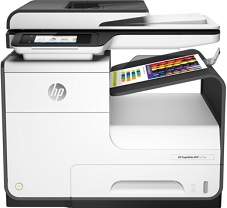
HP PageWide 377dw MFP Driver Download
- 7 drivers
- Supports Windows 10
- Windows · macOS · Linux
- ✓ Safe & free
The PageWide 377dw MFP printer has a good speed of up to 30 pages per minute (ppm) at the ISO mode. For the draft mode, the print speed is up to 45 ppm. More importantly, the user should bear in mind that the rates apply to both monochrome and color printing. The first page is released only after 7 seconds for black and after 7.5 seconds for colored.The printer’s resolution can be up to 1200 x 1200 optimized dpi using an input resolution of 600 x 600 dpi. The duty cycle is up to 40000 printed pages maximum in a month. However, the recommended monthly page volume is between 500 to 3000 printed pages. The print technology is the HP PageWide Technology with the pigmented inks with 1.2 GHz processor speed.Ink cartridgeIntroducing the HP913A Original PageWide Cartridge collection, now available for your printing needs. Choose from the HP913A Black, Cyan, Magenta, and Yellow cartridges, each capable of printing up to 3,000 to 3,500 pages. Our cartridges are engineered with precision and designed to work seamlessly with HP PageWide printers. This ensures that your prints are of the highest quality and consistency, without any smudging or streaking. The HP913A cartridges utilize advanced ink technology to deliver crisp, vibrant colors that are resistant to fading and smudging. This makes them perfect for printing important documents, marketing materials, and even photos. With their high page yield, the HP913A cartridges offer a cost-effective solution for your printing needs. You can enjoy more uninterrupted printing without the need for frequent cartridge replacements. Upgrade your printing experience with the HP913A Original PageWide Cartridge collection. Order now and enjoy the exceptional performance and quality that only HP can provide.The essential print languages encompass the HP PCL GUI 6, PCL 5, HP postscript level 3 emulation, and the native pdf. For standard connectivity options, users can utilize the hi-speed USB 2.0 port, which comes with additional mobile printing features. Mobile printing can also be achieved through software such as HP ePrint, NFC touch-to-print, Apple AirPrint, and Mopria certification.
HP PageWide 377dw MFP Driver Downloads
| Driver | Operating System | Version | Size | Download |
|---|---|---|---|---|
| Full Software and PCL 6 Driver Recommended Recommended | Windows 10Windows 8.1Windows 8Windows 7 | — | 157.9 MB | Download |
| PCL6 Basic Driver with Installer | Windows 10Windows 8.1Windows 8Windows 7Windows VistaWindows XP | — | 58.5 MB | Download |
| PCL6 Basic Driver with Installer | Windows 11Windows 10Windows 8.1Windows 8Windows 7 | — | 66.7 MB | Download |
| Easy Start Printer Setup | Windows 11Windows 10 | — | 9.9 MB | Download |
| Easy Start Printer Setup | Windows 8.1Windows 8 | — | 9.9 MB | Download |
| Easy Start Printer Setup | Windows 7 | — | 9.9 MB | Download |
| Easy Start Printer Setup | macOS | — | 9.1 MB | Download |
How to Install the HP PageWide 377dw MFP Driver
- Click the recommended driver package above and save the file to your PC.
- Open the downloaded file and follow the on-screen HP installer.
- Connect the PageWide 377dw MFP by USB or network when prompted.
- Finish and print a test page to confirm the driver works.