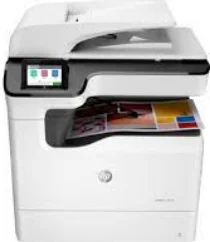
HP PageWide Color MFP 774dn Driver Download
- 17 drivers
- Supports Windows
- Windows · macOS · Linux
- ✓ Safe & free
The HP PageWide Color MFP 774dn model boasts more than just exceptional printing capabilities. This versatile machine also offers optional scanning, copying, and faxing functions. With a range of drivers available, including Windows HP UPD (PCL 6, PS), Windows PCL 6 Discrete, Mac PS, Linux, UNIX, and SAP, the HP PageWide Color MFP 774dn is compatible with a variety of operating systems. When it comes to print quality, this machine delivers impressive results. Black documents can achieve a print resolution of 1200 x 1200 optimized dots per inch (dpi), ensuring sharp and clear text. The input resolution is also impressive, with a resolution of about 600 x 600 dpi when using unspecified, plain HP Premium presentation matte and HP Brochure Matte paper.
HP PageWide Color MFP 774dn Driver Downloads
| Driver | Operating System | Version | Size | Download |
|---|---|---|---|---|
| Full Feature Recommended | Windows | — | 73.4 MB | Download |
| Full Feature Scan | Windows | — | 273.9 MB | Download |
| Easy Start Printer Setup | Windows | — | 9.4 MB | Download |
| Universal Scan Basic Feature Software and | Windows | — | 57.1 MB | Download |
| Universal Scan Basic Feature Software and | Windows | — | 64.3 MB | Download |
| Basic PCL 6 V3 Printer | Windows | — | 14.1 MB | Download |
| Basic PCL 6 V4 Printer | Windows | — | 10.1 MB | Download |
| Universal Fax | Windows | — | 14.6 MB | Download |
| Universal Print | Windows | — | 17.2 MB | Download |
| Universal Print | Windows | — | 19.3 MB | Download |
| Universal Print | Windows | — | 18.4 MB | Download |
| Universal Print | Windows | — | 20.4 MB | Download |
| Universal Print | Windows | — | 17.3 MB | Download |
| Universal Print | Windows | — | 19.3 MB | Download |
| Universal Print | Windows | — | 18.5 MB | Download |
| Universal Print | Windows | — | 20.5 MB | Download |
| Easy Start | macOS | — | 9.1 MB | Download |
How to Install the HP PageWide Color MFP 774dn Driver
- Click the recommended driver package above and save the file to your PC.
- Open the downloaded file and follow the on-screen HP installer.
- Connect the PageWide Color MFP 774dn by USB or network when prompted.
- Finish and print a test page to confirm the driver works.