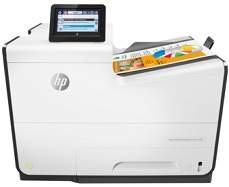
HP PageWide Enterprise Color 556dn Driver Download
- 16 drivers
- Supports Windows 10
- Windows · macOS · Linux
- ✓ Safe & free
HP PageWide Enterprise Color 556dn is a print only color printer, belonging to the PageWide Enterprise color 550 series. The power requirements for this device includes an input voltage between 100 to 240 VAC at a frequency of 50/60 Hz. The power consumption is 52 watts when printing, 12 watts when ready to print and 0.3 watts when manually off. HP PageWide Enterprise Color 556dn power consumption is ENERGY STAR certified.HP PageWide Enterprise Color 556dn ink cartridge. The HP PageWide Enterprise Color 556dn printer is an exceptional device that produces high-quality prints in black, magenta, yellow, and cyan. The printer uses specific cartridges for each color, and you can choose from various replacement options based on model and capacity. In addition, the printer supports multiple print languages, including HP PCL 5, HP PCL 6, HP PostScript 3 emulations, and native PDF printing. The HP PCL 5 is a printer command language that is widely used in business environments. HP PCL 6 is an enhanced version of PCL 5 that offers better graphics and faster printing speeds. Furthermore, the HP PostScript 3 emulation language is a page description language that is used to describe the layout of a printed page. It is commonly used in graphics and publishing applications. Lastly, the native PDF printing language allows you to print PDF files directly from the printer without the need for additional software. Overall, the HP PageWide Enterprise Color 556dn ink cartridge is an excellent choice for businesses that require high-quality and efficient printing capabilities.HP981A Black Original PageWide Cartridge Yield* (6000), HP 981XL High Yield Cyan Original PageWide Cartridge Yield* (10000), HP 981A Magenta Original PageWide Cartridge Yield* (6000), and HP 981A Yellow Original PageWide Cartridge Yield* (6000) are all high-quality options for your printing needs. With their impressive yields, you can rely on these cartridges to produce crisp, clear prints without having to constantly replace them. The HP 981XL High Yield Cyan Original PageWide Cartridge is especially noteworthy with its ability to produce up to 10,000 pages. These cartridges are specifically designed for use with HP PageWide printers, ensuring optimal performance and quality. By using genuine HP cartridges, you can also avoid potential damage to your printer and ensure that your warranty remains valid. Investing in high-quality cartridges not only results in superior prints, but can also save you time and money in the long run. Don't settle for subpar printing results, choose HP cartridges for your printing needs.
HP PageWide Enterprise Color 556dn Driver Downloads
| Driver | Operating System | Version | Size | Download |
|---|---|---|---|---|
| PCL 6 v4 Driver and Installer Recommended | Windows 10Windows 8.1Windows 8 | — | 107.3 MB | Download |
| PCL 6 Full Solution Drivers | Windows 7 | — | 109.8 MB | Download |
| PCL 6 v3 Print Driver no installer | Windows 10Windows 8.1Windows 8Windows 7 | — | 9.5 MB | Download |
| PCL 6 v4 Print Driver no installer | Windows 10Windows 8.1Windows 8 | — | 7.9 MB | Download |
| PCL.6 Print Driver no Installer | Windows VistaWindows XP | — | 15 MB | Download |
| PCL 6 v3 Driver and Installer | Windows 7 | — | 105.8 MB | Download |
| PCL.6 Printer | Windows VistaWindows XP | — | 109.2 MB | Download |
| PCL6 Universal Print | Windows 11Windows 10Windows 8.1Windows 8Windows 7 | — | 18.3 MB | Download |
| PCL6 Universal Print | Windows 11Windows 10Windows 8.1Windows 8Windows 7 | — | 20.7 MB | Download |
| PostScript Universal Print | Windows 11Windows 10Windows 8.1Windows 8Windows 7 | — | 19.5 MB | Download |
| PostScript Universal Print | Windows 11Windows 10Windows 8.1Windows 8Windows 7 | — | 21.8 MB | Download |
| USB Connected PCL6 Universal Print | Windows 11Windows 10Windows 8.1Windows 8Windows 7 | — | 18.4 MB | Download |
| USB Connected PCL6 Universal Print | Windows 11Windows 10Windows 8.1Windows 8Windows 7 | — | 20.7 MB | Download |
| USB Connected PostScript Universal Print | Windows 11Windows 10Windows 8.1Windows 8Windows 7 | — | 19.6 MB | Download |
| USB Connected PostScript Universal Print | Windows 11Windows 10Windows 8.1Windows 8Windows 7 | — | 21.9 MB | Download |
| Easy Start Printer Setup | macOS | — | 9.1 MB | Download |
How to Install the HP PageWide Enterprise Color 556dn Driver
- Click the recommended driver package above and save the file to your PC.
- Open the downloaded file and follow the on-screen HP installer.
- Connect the PageWide Enterprise Color 556dn by USB or network when prompted.
- Finish and print a test page to confirm the driver works.