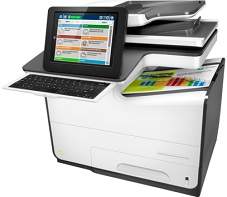
HP PageWide Enterprise Color Flow MFP 586z Driver Download
- 23 drivers
- Supports Windows 10
- Windows · macOS · Linux
- ✓ Safe & free
Any user who acquires this product must have just had one of the latest Page Wide Enterprise printers of multifunctional abilities money can buy. The primary functions include printing, scanning, copying, sending and receiving fax messages. The product number for unique identification is G1W41A#BGJ.HP PageWide Enterprise Color Flow MFP 586z ink cartridge.Introducing HP's Original PageWide Cartridges, available in three different yields - standard, high, and extra high. The HP981A Black Original PageWide Cartridge offers up to 6,000 pages, while the HP 981X High Yield Black Original PageWide Cartridge can print up to 11,000 pages. For even more impressive page yields, the HP 981Y Extra High Yield Black Original PageWide Cartridge can print up to 20,000 pages. In addition to black, HP's Original PageWide Cartridges are also available in cyan, magenta, and yellow. The HP 981A Cyan, Magenta, and Yellow Original PageWide Cartridges can print up to 6,000 pages each, while the high yield HP 981X versions can print up to 10,000 pages. For the ultimate in page yields, the HP 981Y Extra High Yield versions can print up to 16,000 pages. Whether you're looking for standard, high, or extra high yields, HP's Original PageWide Cartridges offer reliable and efficient printing. With their advanced technology and superior performance, these cartridges are the perfect choice for businesses and professionals who demand the best. So why settle for anything less? Choose HP's Original PageWide Cartridges today and experience the difference for yourself.Among the remarkable attributes of this device, its exceptional performance is noteworthy, thanks to its Secure Hard Disk. Additionally, it boasts of automatic duplex printing, which allows for double-sided printing, maximizing efficiency and minimizing paper waste. Notably, this device also features a convenient pull-out keyboard, a Gigabit Ethernet, and Mopria certification for mobile printing. These unique properties further enhance the user experience and make this gadget an ideal choice for those seeking high-quality and efficient printing solutions.In terms of Mobile printing, the HP ePrint, Apple AirPrint, and Google Cloud Print software are all supported by this printer. Additionally, it boasts an extra high yield ink that ensures optimal printing quality. The faxing function operates at a high speed of 3 seconds per page, thanks to the ITU-T test image at a standard resolution and MMR encoding.
HP PageWide Enterprise Color Flow MFP 586z Driver Downloads
| Driver | Operating System | Version | Size | Download |
|---|---|---|---|---|
| PCL 6 Full Solution Recommended | Windows 10Windows 8.1Windows 8 | — | 122.1 MB | Download |
| PCL 6 Full Solution Drivers | Windows 7 | — | 127.5 MB | Download |
| USB Twain Scan Package | Windows 10Windows 8.1Windows 8Windows 7 | — | 8.4 MB | Download |
| PCL 6 v3 Print Driver no installer | Windows 10Windows 8.1Windows 8Windows 7 | — | 9.5 MB | Download |
| PCL 6 v4 Print Driver no installer | Windows 10Windows 8.1Windows 8 | — | 7.9 MB | Download |
| PCL 6 v3 Driver and Installer | Windows 7 | — | 120.5 MB | Download |
| PCL.6 Print Driver no installer | Windows VistaWindows XP | — | 15 MB | Download |
| PCL.6 Printer | Windows VistaWindows XP | — | 124.1 MB | Download |
| MFP Network Twain Scan Package | Windows 8.1Windows 8Windows 7 | — | 14.8 MB | Download |
| Universal Fax | Windows 11Windows 10Windows 8.1Windows 7 | — | 16.7 MB | Download |
| Universal Fax | Windows 11Windows 10Windows 8.1Windows 7 | — | 8.9 MB | Download |
| PCL6 Universal Print | Windows 11Windows 10Windows 8.1Windows 8Windows 7 | — | 18.3 MB | Download |
| PCL6 Universal Print | Windows 11Windows 10Windows 8.1Windows 8Windows 7 | — | 20.7 MB | Download |
| PostScript Universal Print | Windows 11Windows 10Windows 8.1Windows 8Windows 7 | — | 19.5 MB | Download |
| PostScript Universal Print | Windows 11Windows 10Windows 8.1Windows 8Windows 7 | — | 21.8 MB | Download |
| USB Connected PCL6 Universal Print | Windows 11Windows 10Windows 8.1Windows 8Windows 7 | — | 18.4 MB | Download |
| USB Connected PCL6 Universal Print | Windows 11Windows 10Windows 8.1Windows 8Windows 7 | — | 20.7 MB | Download |
| USB Connected PostScript Universal Print | Windows 11Windows 10Windows 8.1Windows 8Windows 7 | — | 19.6 MB | Download |
| USB Connected PostScript Universal Print | Windows 11Windows 10Windows 8.1Windows 8Windows 7 | — | 21.9 MB | Download |
| Universal Scan Full Feature Driver | Windows 11Windows 10Windows 8.1Windows 7 | — | 314.9 MB | Download |
| Universal Scan Basic Feature Driver | Windows 10Windows 8.1Windows 7 | — | 67.7 MB | Download |
| Universal Scan Basic Feature Driver | Windows 11Windows 10Windows 8.1Windows 7 | — | 83.1 MB | Download |
| Easy Start Printer Setup | macOS | — | 9.1 MB | Download |
How to Install the HP PageWide Enterprise Color Flow MFP 586z Driver
- Click the recommended driver package above and save the file to your PC.
- Open the downloaded file and follow the on-screen HP installer.
- Connect the PageWide Enterprise Color Flow MFP 586z by USB or network when prompted.
- Finish and print a test page to confirm the driver works.