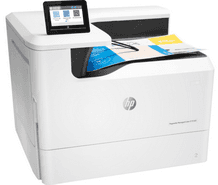
HP PageWide Managed Color E75160dn Driver Download
- 17 drivers
- Supports Windows 11
- Windows · macOS · Linux
- ✓ Safe & free
The HP PageWide Managed Color E75160dn printer is an excellent choice for commercial printing, producing high-quality monochrome and color prints at impressive speeds. With a paper input tray capacity of up to 100 sheets of plain paper, and an additional tray that holds up to 550 sheets, this printer is well-suited for high-volume printing tasks. For even larger print jobs, there is an optional third tray that can also hold up to 550 sheets. One of the standout features of this printer is its use of a special 4000-sheet high capacity input (HCI) tray. This tray allows for even more paper to be loaded at once, reducing the need for frequent refills and improving overall printing efficiency. With its advanced paper handling capabilities and impressive print quality, the HP PageWide Managed Color E75160dn is a top choice for any business looking to produce professional-grade prints.Replacing CartridgesHP 992XC Black Contract PageWide Cartridge (~ 22,000 pages)Cyan Contract PageWide HP 992XC Cartridge (~ 16,000 pages)Magenta Contract PageWide HP 992XC Cartridge (~ 16,000 pages)HP 992XC Yellow Contract PageWide Cartridge (~ 16,000 pages).
HP PageWide Managed Color E75160dn Driver Downloads
| Driver | Operating System | Version | Size | Download |
|---|---|---|---|---|
| Full Feature Driver Recommended | Windows 11Windows 10Windows 8.1Windows 8Windows 7 | — | 91.6 MB | Download |
| PCL 6 V3 Printer Driver no installer | Windows 11Windows 10Windows 8.1Windows 8Windows 7Windows VistaWindows XP | — | 14.1 MB | Download |
| PCL 6 V4 Printer Driver no installer | Windows 11Windows 10Windows 8.1Windows 8 | — | 10.1 MB | Download |
| PCL 6 XPV Printer Driver no installer | Windows VistaWindows XP | — | 14.7 MB | Download |
| PCL6 Universal Print | Windows 11Windows 10Windows 8.1Windows 8Windows 7 | — | 18.3 MB | Download |
| PCL6 Universal Print | Windows 11Windows 10Windows 8.1Windows 8Windows 7 | — | 20.7 MB | Download |
| PostScript Universal Print | Windows 11Windows 10Windows 8.1Windows 8Windows 7 | — | 19.5 MB | Download |
| PostScript Universal Print | Windows 11Windows 10Windows 8.1Windows 8Windows 7 | — | 21.8 MB | Download |
| USB Connected PCL6 Universal Print | Windows 11Windows 10Windows 8.1Windows 8Windows 7 | — | 18.4 MB | Download |
| USB Connected PCL6 Universal Print | Windows 11Windows 10Windows 8.1Windows 8Windows 7 | — | 20.7 MB | Download |
| USB Connected PostScript Universal Print | Windows 11Windows 10Windows 8.1Windows 8Windows 7 | — | 19.6 MB | Download |
| USB Connected PostScript Universal Print | Windows 11Windows 10Windows 8.1Windows 8Windows 7 | — | 21.9 MB | Download |
| Easy Start Printer Setup | Windows 11Windows 10 | — | 11.3 MB | Download |
| Easy Start Printer Setup | Windows 8.1Windows 8 | — | 11.3 MB | Download |
| Easy Start Printer Setup | Windows 7 | — | 11.3 MB | Download |
| Easy Start Printer Setup | macOS | — | 9.1 MB | Download |
| hp helip installer 3.17.9.run | Windows | — | 22.8 MB | Download |
How to Install the HP PageWide Managed Color E75160dn Driver
- Click the recommended driver package above and save the file to your PC.
- Open the downloaded file and follow the on-screen HP installer.
- Connect the PageWide Managed Color E75160dn by USB or network when prompted.
- Finish and print a test page to confirm the driver works.