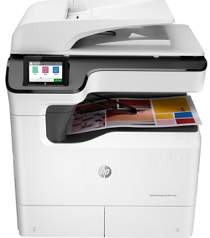
HP PageWide Managed Color MFP P77440dn Driver Download
- 22 drivers
- Supports Windows 11
- Windows · macOS · Linux
- ✓ Safe & free
The HP PageWide Managed Color MFP P77440dn printer is a top-of-the-line product that boasts exceptional capabilities. This multifunction device is designed to print, copy, and scan documents with unparalleled quality, making it a reliable addition to any office. One of the standout features of this printer is its impressive paper handling capacity. It has a primary input tray that can hold up to 100 sheets of plain paper, and two additional trays that can each hold 550 sheets of paper. This means that you can print large quantities of documents without worrying about running out of paper. Furthermore, this printer also offers an optional input accessory that can hold an additional 550 sheets of paper, allowing for even more uninterrupted printing. The automatic duplex printing feature makes it easy to print on both sides of the paper, saving time and reducing paper waste. Overall, the HP PageWide Managed Color MFP P77440dn printer is a high-performance device that can handle all your printing needs. Its advanced features and exceptional quality make it a must-have for any office looking to streamline their printing processes.
HP PageWide Managed Color MFP P77440dn Driver Downloads
| Driver | Operating System | Version | Size | Download |
|---|---|---|---|---|
| Full Software Solution Recommended | Windows 11Windows 10Windows 8.1Windows 8Windows 7 | — | 75.5 MB | Download |
| PCL 6 V3 Printer Driver no installer | Windows 11Windows 10Windows 8.1Windows 8Windows 7 | — | 14.1 MB | Download |
| PCL 6 V4 Printer Driver no installer | Windows 11Windows 10Windows 8.1 | — | 10.1 MB | Download |
| MFP Network Twain Scan Package | Windows 8.1Windows 8Windows 7 | — | 14.8 MB | Download |
| Universal Fax | Windows 11Windows 10Windows 8.1Windows 7 | — | 16.7 MB | Download |
| Universal Fax | Windows 11Windows 10Windows 8.1Windows 7 | — | 8.9 MB | Download |
| PCL6 Universal Print | Windows 11Windows 10Windows 8.1Windows 8Windows 7 | — | 18.3 MB | Download |
| PCL6 Universal Print | Windows 11Windows 10Windows 8.1Windows 8Windows 7 | — | 20.7 MB | Download |
| PostScript Universal Print | Windows 11Windows 10Windows 8.1Windows 8Windows 7 | — | 19.5 MB | Download |
| PostScript Universal Print | Windows 11Windows 10Windows 8.1Windows 8Windows 7 | — | 21.8 MB | Download |
| USB Connected PCL6 Universal Print | Windows 11Windows 10Windows 8.1Windows 8Windows 7 | — | 18.4 MB | Download |
| USB Connected PCL6 Universal Print | Windows 11Windows 10Windows 8.1Windows 8Windows 7 | — | 20.7 MB | Download |
| USB Connected PostScript Universal Print | Windows 11Windows 10Windows 8.1Windows 8Windows 7 | — | 19.6 MB | Download |
| USB Connected PostScript Universal Print | Windows 11Windows 10Windows 8.1Windows 8Windows 7 | — | 21.9 MB | Download |
| Universal Scan Full Feature Driver | Windows 11Windows 10Windows 8.1Windows 7 | — | 349.8 MB | Download |
| Universal Scan Basic Feature Driver | Windows 10Windows 8.1Windows 7 | — | 84.1 MB | Download |
| Universal Scan Basic Feature Driver | Windows 11Windows 10Windows 8.1Windows 7 | — | 104.8 MB | Download |
| Easy Start Printer Setup | Windows 11Windows 10 | — | 11.3 MB | Download |
| Easy Start Printer Setup | Windows 8.1Windows 8 | — | 11.3 MB | Download |
| Easy Start Printer Setup | Windows 7 | — | 11.3 MB | Download |
| Easy Start Printer Setup | macOS | — | 9.1 MB | Download |
| hp helip installer 3.18.5.run | Windows | — | 21.4 MB | Download |
How to Install the HP PageWide Managed Color MFP P77440dn Driver
- Click the recommended driver package above and save the file to your PC.
- Open the downloaded file and follow the on-screen HP installer.
- Connect the PageWide Managed Color MFP P77440dn by USB or network when prompted.
- Finish and print a test page to confirm the driver works.